
share your set up here!
xbox/playstation:
left analog:
left analog button:
right analog:
right analog button:
left bumper 1:
left bumper 2:
right bumper 1:
right bumber 2:
button a:
button x:
button y:
button b:
Start button:
select/back button:
(directional pad)
up:
down:
left:
right:
controller - setups
-
doitnasty
- Posts: 119
- Joined: Wed Apr 24, 2013 8:52 pm
- Team: Privateer
- Location: USA
controller - setups
Come practice with us!!
https://discord.gg/vGSczY
https://discord.gg/vGSczY
-
doitnasty
- Posts: 119
- Joined: Wed Apr 24, 2013 8:52 pm
- Team: Privateer
- Location: USA
Re: controller - setups
share your set up here!
xbox/playstation: xbox
left analog: up gas/down rear brake
left analog button: n/a
right analog: up/down leaning, right/left stearing
right analog button: n/a
left bumper 1: downshift
left bumper 2: clutch
right bumper 1: upshift
right bumber 2: front brake
button a: sit/dab
button x: n/a
button y: n/a
button b: backup
Start button: pause
select/back button: n/a
(directional pad)
up: n/a
down: n/a
left: n/a
right: n/a
xbox/playstation: xbox
left analog: up gas/down rear brake
left analog button: n/a
right analog: up/down leaning, right/left stearing
right analog button: n/a
left bumper 1: downshift
left bumper 2: clutch
right bumper 1: upshift
right bumber 2: front brake
button a: sit/dab
button x: n/a
button y: n/a
button b: backup
Start button: pause
select/back button: n/a
(directional pad)
up: n/a
down: n/a
left: n/a
right: n/a
Come practice with us!!
https://discord.gg/vGSczY
https://discord.gg/vGSczY
-
Scotty226
- Posts: 2225
- Joined: Wed Feb 29, 2012 7:28 am
- Team: Crisp Graphics
- Location: Sydney
Re: controller - setups
xbox/playstation: xbox
left analog:steering
left analog button: n/a
right analog: n/a
right analog button: n/a
lb: clutch
lt: front brake
rb: back brake
rt: throttle
button a: up shift
button x: sit/dab
button y: back up
button b: down shift
Start button: pause
select/back button: mute teamspeak
(directional pad)
up: n/a
down: n/a
left: n/a
right: n/a
left analog:steering
left analog button: n/a
right analog: n/a
right analog button: n/a
lb: clutch
lt: front brake
rb: back brake
rt: throttle
button a: up shift
button x: sit/dab
button y: back up
button b: down shift
Start button: pause
select/back button: mute teamspeak
(directional pad)
up: n/a
down: n/a
left: n/a
right: n/a

0 | 1 | 0 | 4
2014 Loretta Lynns 250 Pro Sport 2nd
-
ryanmx25
- Posts: 1213
- Joined: Mon Mar 07, 2011 12:16 am
- Location: ohio
Re: controller - setups
xbox/playstation:Xbox
left analog:Turn/Lean back foward
left analog button:N/A
right analog:N/A
right analog button:N/A
left bumper 1:Clutch
left bumper 2:F Brack
right bumper 1:Sit Dab
right bumber 2:Throttle
button a:Shift Up
button x:R Brake
button y:Reverse
button b:Shift down
Start button:Pause
select/back button:Chat
(directional pad)
up:
down:
left:
right:
left analog:Turn/Lean back foward
left analog button:N/A
right analog:N/A
right analog button:N/A
left bumper 1:Clutch
left bumper 2:F Brack
right bumper 1:Sit Dab
right bumber 2:Throttle
button a:Shift Up
button x:R Brake
button y:Reverse
button b:Shift down
Start button:Pause
select/back button:Chat
(directional pad)
up:
down:
left:
right:

-
MX181
- Posts: 809
- Joined: Tue Dec 25, 2012 12:45 am
- Location: STRAYA
Re: controller - setups
xbox/playstation: playstation (it has throttle control!!!)
left analog up: lean forward
left analog down: lean back
left analog left: lean left
left analog right: lean right
R1: sit dab
R2: Throttle
L1: Clutch
L2: Front brake
button square: upshift
button x: downshift and back brake
button triangle: reverse
button circle: nothing
Start button: previous rider
select/back button: next rider
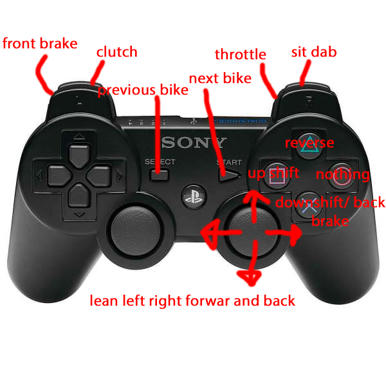
left analog up: lean forward
left analog down: lean back
left analog left: lean left
left analog right: lean right
R1: sit dab
R2: Throttle
L1: Clutch
L2: Front brake
button square: upshift
button x: downshift and back brake
button triangle: reverse
button circle: nothing
Start button: previous rider
select/back button: next rider

-
JerryLaw
- Crushed Dissenter
- Posts: 239
- Joined: Sun Feb 10, 2013 10:45 am
- Team: Privateer
Re: controller - setups
box/playstation: Xbox
left analog: left = left right = right
left analog button: sit/dab
right analog: up= lean forward down = lean backwards
right analog button: n/a
left bumper 1: downshift
left trigger: frontbrake
right bumper 1:upshift
right triggerr: throttle
button a: clutch
button x: n/a
button y: n/a
button b: rear brake
Start button: pause
select/back button: backup
left analog: left = left right = right
left analog button: sit/dab
right analog: up= lean forward down = lean backwards
right analog button: n/a
left bumper 1: downshift
left trigger: frontbrake
right bumper 1:upshift
right triggerr: throttle
button a: clutch
button x: n/a
button y: n/a
button b: rear brake
Start button: pause
select/back button: backup
-
mikez#411
- Posts: 1225
- Joined: Tue Feb 02, 2010 9:13 pm
Re: controller - setups
box/playstation: Xbox
left analog: turn/lean forward
left analog button:n/a
right analog: up= throttle
right analog button: n/a
left bumper 1: Clutch & Rearbrake
left trigger: frontbrake
right bumper 1:sit/dab
right triggerr: Upshift
button a: n/a
button x: upshift
button y: n/a
button b: n/a
Start button: n/a
select/back button: Pause
left analog: turn/lean forward
left analog button:n/a
right analog: up= throttle
right analog button: n/a
left bumper 1: Clutch & Rearbrake
left trigger: frontbrake
right bumper 1:sit/dab
right triggerr: Upshift
button a: n/a
button x: upshift
button y: n/a
button b: n/a
Start button: n/a
select/back button: Pause
-
MrStickers
- Posts: 327
- Joined: Wed Sep 07, 2011 5:49 pm
Re: controller - setups
xbox/playstation: Xbox
left analog: left = left right = right
left analog button:
right analog: up= lean forward down = lean backwards
right analog button: Sit\dab
left bumper 1: Clutch
left trigger: Brakes
right bumper 1:N\A
right trigger: throttle
button a: downshift
button x: upshift
button y: n/a
button b: back up
Start button: pause
select/back button: N\A
left analog: left = left right = right
left analog button:
right analog: up= lean forward down = lean backwards
right analog button: Sit\dab
left bumper 1: Clutch
left trigger: Brakes
right bumper 1:N\A
right trigger: throttle
button a: downshift
button x: upshift
button y: n/a
button b: back up
Start button: pause
select/back button: N\A
-
bc45
- Posts: 404
- Joined: Wed Apr 25, 2012 1:05 am
- Location: Southeast United States
- Contact:
Re: controller - setups
share your set up here!
xbox/playstation: xbox
left analog: steering
left analog button:n/a
right analog: lean back and forward
right analog button: n/a
left bumper 1:clutch
left bumper 2: "both" brakes
right bumper 1: reverse
right bumber 2: throttle
button a:downshift
button x:sit/dab
button y:n/a
button b:upshift
Start button:pause
select/back button:n/a
(directional pad)
up:n/a
down:n/a
left:n/a
right:n/a
xbox/playstation: xbox
left analog: steering
left analog button:n/a
right analog: lean back and forward
right analog button: n/a
left bumper 1:clutch
left bumper 2: "both" brakes
right bumper 1: reverse
right bumber 2: throttle
button a:downshift
button x:sit/dab
button y:n/a
button b:upshift
Start button:pause
select/back button:n/a
(directional pad)
up:n/a
down:n/a
left:n/a
right:n/a
| 2nd overall in 2013 Loretta Lynn's 125 and 250 B |8th in 2014 250 West Coast Phoenix Main Event
http://roostmx.net/
Facebook @baileycroommusic
Instagram @baileycroommusic
YouTube @baileycroommusic
http://roostmx.net/
Facebook @baileycroommusic
Instagram @baileycroommusic
YouTube @baileycroommusic