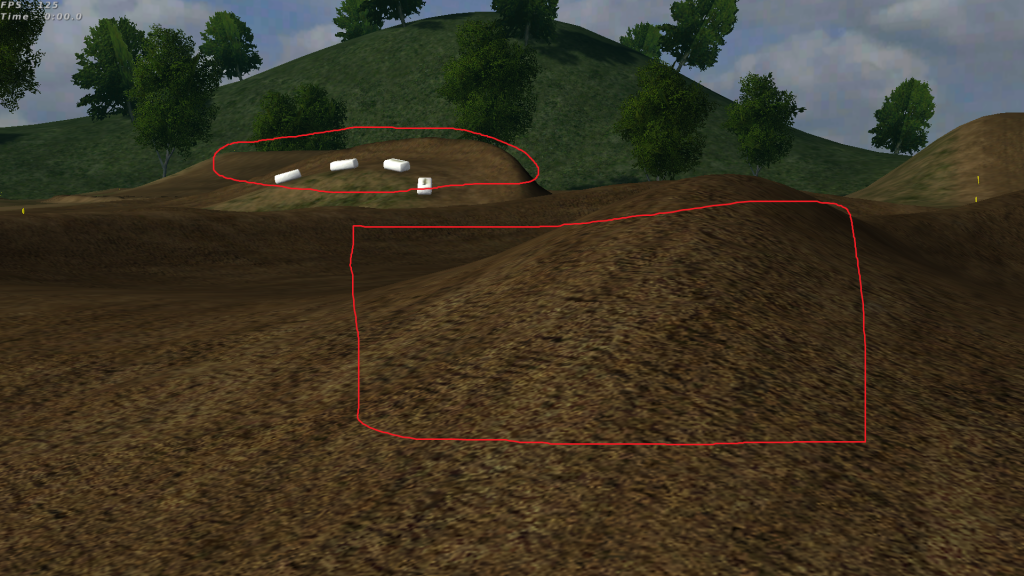
I was just wondering if there is a setting for rendering the whole track instead of just bits and pieces, or is it because I don't have the greatest graphics card (AMD 7750). (FYI settings for the screeny is 1024x1024, sliders maxed, shaders on, with shaders direct.) Compare the square to the circle.
Re: Towards JLV
Posted: Thu Jul 17, 2014 5:11 pm
by yzmxer608
It's related to the tiles the decals are rendered on, if you use a higher fov it's harder to see that. If it didn't it would be extremely hard on your computer.
You do not have to care about the focus of the texture in long distances.
This problem is not only the game, but the size of the memory of your video card.
You can improve this by increasing the anisotropic filtering settings directly on your video card to 16x.
But it consumes too much memory on video, and makes the processor buff more textures per clock and can dramatically decrease the performance of the game.
Re: Towards JLV
Posted: Thu Jul 17, 2014 8:11 pm
by jeremy103
Paulo#33 wrote:You do not have to care about the focus of the texture in long distances.
This problem is not only the game, but the size of the memory of your video card.
You can improve this by increasing the anisotropic filtering settings directly on your video card to 16x.
But it consumes too much memory on video, and makes the processor buff more textures per clock and can dramatically decrease the performance of the game.
The problem isn't far the far distance not being rendered, it's when i'm looking at the track and one decals looks good and the one next to it looks like im running everything on low. That was the main idea to this post but that was the only example i could think of. It is in this video at the very beginning when i'm jumping into a turn you see a triangle shape where the decal on the bottom look great but the one on top looks crappy.
Re: Towards JLV
Posted: Thu Jul 17, 2014 8:13 pm
by jeremy103
Sorry for the dp but if you stop the video at 15sec you will see what i'm talking about.
Re: Towards JLV
Posted: Thu Jul 17, 2014 11:47 pm
by jlv
Are you using Shaders/Direct as the terrain rendering method? If you don't use one of the direct modes the terrain cache resolution is silently limited to 256x256.
Re: Towards JLV
Posted: Fri Jul 18, 2014 9:13 pm
by jeremy103
jlv wrote:Are you using Shaders/Direct as the terrain rendering method? If you don't use one of the direct modes the terrain cache resolution is silently limited to 256x256.
Yes I am using shaders direct as the terrain render method. Should I be using copy?
Re: Towards JLV
Posted: Sat Jul 19, 2014 12:31 am
by jlv
No, you definitely want direct if you're going for maximum terrain resolution.
Re: Towards JLV
Posted: Sat Jul 19, 2014 2:20 am
by jeremy103
jlv wrote:No, you definitely want direct if you're going for maximum terrain resolution.
Ok, I always run direct but the main reason for this was because in certain peoples screenshots their terrain looked the same all around. Then when I take a screenshot the decals decide to go poop on me. Like in the video I posted one decal looks great but the one right next to it, it's all blurry.
Re: Towards JLV
Posted: Sat Jul 19, 2014 2:34 am
by jlv
I thought it looked a little soft too. That's why I thought you might be in Copy mode. If you can move a bit closer and use less zoom it'll help somewhat.
Re: Towards JLV
Posted: Sat Jul 19, 2014 4:13 am
by jeremy103
jlv wrote:I thought it looked a little soft too. That's why I thought you might be in Copy mode. If you can move a bit closer and use less zoom it'll help somewhat.
I have noticed that but didn't know if there was another solutions. Thanks for the help.