
So what kind of drive setup does everyone use? Right now I have a 128GB SSD with my operating system and everything including MX Simulator and other games installed on it. I also have a 500Gb HDD and I use that only for storing personal files like movies, pictures etc.. I don't have much space left on the SSD and it's definitely getting slower so I think I need to make a change.
I am thinking about buying a 250GB SSD and using that for my operating system as well as minor applications like Adobe programs, Microsoft Office, teamspeak etc.. and then using my current SSD (128GB) for all my games, and than keeping my 500GB HDD for all my personal files. That way my computer still boots up fast. Or I was thinking of just moving my games and installing them on my HDD (still 350GB free space). I know it might make the loading times a bit slower but not a huge deal. Also if were to do this would I be able to move my personal folder over to my HDD or is it stuck on my local drive (SSD)?
Any suggestions?
Best hard drive setup?
-
SMR 510RR
- Posts: 2526
- Joined: Sun Apr 08, 2012 6:36 am
- Team: Privateer
Re: Best hard drive setup?
I would upgrade to a 250 or 500 gb SSD. With 250 you can install most of your programs on there, stuff like your MXS personal folder can use a symbolic link to the HDD so it doesn't take up space on the SSD. A symbolic link (symlink) is used to reference a different location. For example windows will still show your personal folder in the C drive location but it is actually located in the D drive. In fact you can do that with anything on your SSD so maybe you will have enough room without upgrading, its nice because you can undo it if you ever need/want to depending on how your needs change.
This is a good utility that makes it easy to do:
http://download.cnet.com/SymMover/3000- ... 77418.html
This is a good utility that makes it easy to do:
http://download.cnet.com/SymMover/3000- ... 77418.html
-
JVanderlee225
- Posts: 524
- Joined: Wed Aug 24, 2011 1:43 pm
- Team: MadCape
Re: Best hard drive setup?
Thanks a lot man! Saved 40 gb of SSD space. It's a good fix for now until I decide to upgrade my SSD.
-
SMR 510RR
- Posts: 2526
- Joined: Sun Apr 08, 2012 6:36 am
- Team: Privateer
Re: Best hard drive setup?
No problem, I learned about it on here so just passing it along.
There are always good deals on SSDs, 256 for ~$100 and 500gb for $180 not too bad they have come a long way recently.
There are always good deals on SSDs, 256 for ~$100 and 500gb for $180 not too bad they have come a long way recently.
-
DK662
- Posts: 367
- Joined: Thu May 05, 2011 1:57 pm
- Location: CO
Re: Best hard drive setup?
Wouldn't having mxsim personal folder on a hdd and the game on a ssd defeat the purpose of the ssd? Considering all the tracks and skins take the most time to load. I have my personal folder and the game on my ssd. But when i switched everything from my hdd to ssd I noticed no performance gains other than faster loading times. Expecially in a server with 30+ riders on big national tracks.
-
SMR 510RR
- Posts: 2526
- Joined: Sun Apr 08, 2012 6:36 am
- Team: Privateer
Re: Best hard drive setup?
Yes those files will not get a bump in loading time. You could for example put a few of your favorite tracks and gear in the install folder though since it is still on the SSD. I cant justify using all that room on my expensive SSD when it is already full with programs and files I actually use a lot more than some track I downloaded 3 years ago. At the end of the day in a server it really doesn't matter, you are waiting for the slowest person to load anyways but for riding in single player it obviously makes a difference.DK662 wrote:Wouldn't having mxsim personal folder on a hdd and the game on a ssd defeat the purpose of the ssd? Considering all the tracks and skins take the most time to load. I have my personal folder and the game on my ssd. But when i switched everything from my hdd to ssd I noticed no performance gains other than faster loading times. Expecially in a server with 30+ riders on big national tracks.
The real benefit of a SSD IMO is the windows boot time, overall speed of windows, and quick loading of your most used applications. Even if I had a 500GB SSD I still wouldn't leave my personal folder on it because there are other things I would rather transfer back and I would like to leave some room for new stuff since I have none currently.
-
KTM57
- Posts: 13872
- Joined: Wed Jul 07, 2010 2:42 am
- Location: TX
- Contact:
Re: Best hard drive setup?
Load times are going to be more influenced by your graphics settings and how much shit your computer is drawing than your disk speed. The game loads the personal folder on startup; that's why you can't drop content in and then use it without restarting the game first.
This is a block of text that can be added to posts you make. There is a 255 character limit.
-
Wahlamt
- Posts: 7965
- Joined: Mon Sep 13, 2010 3:15 pm
- Team: MLG Compton
- Location: Sweden
- Contact:
Re: Best hard drive setup?
I think this thread ties in pretty good with a SSD/HDD question I have. At my birthday I got 2 120GB SSD's (was expecting 1) so now I have one for my desktop. And it is regarding "splicing" the SSD. Is it possible like and install option in windows to have "my documents/pics etc", program files/pf x86 on drive D instead of my C SSD? Or will I have to choose manually to install everything on D?

-
SMR 510RR
- Posts: 2526
- Joined: Sun Apr 08, 2012 6:36 am
- Team: Privateer
Re: Best hard drive setup?
You can move your users folders, simply right click>properties>move>select new location. Only thing is make sure it is the same exact spelling and capitalization otherwise the icons get wonky.Wahlamt wrote:I think this thread ties in pretty good with a SSD/HDD question I have. At my birthday I got 2 120GB SSD's (was expecting 1) so now I have one for my desktop. And it is regarding "splicing" the SSD. Is it possible like and install option in windows to have "my documents/pics etc", program files/pf x86 on drive D instead of my C SSD? Or will I have to choose manually to install everything on D?
As far as Program Files (x86) you would either have to manually install it in the D location or just move the whole directory using a symlink.
-
Pumaxcs
- Posts: 13227
- Joined: Sat Dec 15, 2007 11:50 pm
- Team: Kyle/Luiz
- Location: Western, Kentucky
Re: Best hard drive setup?
I have 2 drives, one SSD and one HDD. If you think you have to keep the naming scheme in place to install games on a different drive such as "C:/Program Files" or "D:/Program Files" that isn't true. My C:/ has all my Windows things and its the SSD. The HDD has 3 subfolders called Downloads, Games, Media. I download things to the HDD to keep the read/write cycles off the SSD when it doesn't have to be and the Games folder is simply where I install games and Media where I store images and video, more recently AutoCAD aswell. Where games suggest to go like "C:/Program Files/" they save as "D:/Games/" and create their own folders from there, same as they would have on C:/.

-
Wahlamt
- Posts: 7965
- Joined: Mon Sep 13, 2010 3:15 pm
- Team: MLG Compton
- Location: Sweden
- Contact:
Re: Best hard drive setup?
Okay, thanks! I will definitely try the move thingy.SMR 510RR wrote:You can move your users folders, simply right click>properties>move>select new location. Only thing is make sure it is the same exact spelling and capitalization otherwise the icons get wonky.Wahlamt wrote:I think this thread ties in pretty good with a SSD/HDD question I have. At my birthday I got 2 120GB SSD's (was expecting 1) so now I have one for my desktop. And it is regarding "splicing" the SSD. Is it possible like and install option in windows to have "my documents/pics etc", program files/pf x86 on drive D instead of my C SSD? Or will I have to choose manually to install everything on D?
As far as Program Files (x86) you would either have to manually install it in the D location or just move the whole directory using a symlink.
-
JVanderlee225
- Posts: 524
- Joined: Wed Aug 24, 2011 1:43 pm
- Team: MadCape
Re: Best hard drive setup?
Ya I notice my game is initially taking about 2-3 seconds longer to start up now that my personal folder is moved to my HDD. Not a huge deal because I don't notice a difference in loading times in-game though.KTM57 wrote:Load times are going to be more influenced by your graphics settings and how much shit your computer is drawing than your disk speed. The game loads the personal folder on startup; that's why you can't drop content in and then use it without restarting the game first.
Also another question while you smart people are here, I am currently running an AMD FX-8150 8 core processor with a GTX 970. I am noticing that I can max out my graphics in single player and have solid 125fps, but on a 40 man gate in nationals I only get about 50-70 fps no matter if I put it on max detail or the lowest detail. Is this just my CPU bottle necking my graphics card because it is too weak to run all 40 riders?
I bought the CPU almost 3 years ago and I now realize I should have went Intel and I plan on switching eventually, but is it just as simple as AMD sucks with Sim because of more weaker cores instead of less stronger cores? (don't know how that works just my understanding) I feel like I should be able to run a smooth 125fps in nationals at least on low detail with a 970 but that is not even the case. Also if it helps I checked task manager with Sim open in windowed mode and in game it said I was only using about 20% of my cpu. Is there anything I can do? (other than buy a new cpu)
-
SMR 510RR
- Posts: 2526
- Joined: Sun Apr 08, 2012 6:36 am
- Team: Privateer
Re: Best hard drive setup?
That is a tough one to answer, I think Puma would be able to give you better guidance here. Do you have lots of team skins, what track and object pack detail level are you using, and how many mb of memory does it say you are using when you load in? The 970 is a great card but if you get above 3.5gb it will start slowing down big time so that is something to watch out for although if you are running something like med/med on the track and just your skins I don't see that being a problem.JVanderlee225 wrote:Ya I notice my game is initially taking about 2-3 seconds longer to start up now that my personal folder is moved to my HDD. Not a huge deal because I don't notice a difference in loading times in-game though.KTM57 wrote:Load times are going to be more influenced by your graphics settings and how much shit your computer is drawing than your disk speed. The game loads the personal folder on startup; that's why you can't drop content in and then use it without restarting the game first.
Also another question while you smart people are here, I am currently running an AMD FX-8150 8 core processor with a GTX 970. I am noticing that I can max out my graphics in single player and have solid 125fps, but on a 40 man gate in nationals I only get about 50-70 fps no matter if I put it on max detail or the lowest detail. Is this just my CPU bottle necking my graphics card because it is too weak to run all 40 riders?
I bought the CPU almost 3 years ago and I now realize I should have went Intel and I plan on switching eventually, but is it just as simple as AMD sucks with Sim because of more weaker cores instead of less stronger cores? (don't know how that works just my understanding) I feel like I should be able to run a smooth 125fps in nationals at least on low detail with a 970 but that is not even the case. Also if it helps I checked task manager with Sim open in windowed mode and in game it said I was only using about 20% of my cpu. Is there anything I can do? (other than buy a new cpu)
In task manager can you see that 2 cores are maxed but the rest are idle? Do you have your card plugged into the correct slot on your motherboard? What motherboard do you have?
-
JVanderlee225
- Posts: 524
- Joined: Wed Aug 24, 2011 1:43 pm
- Team: MadCape
Re: Best hard drive setup?
Currently I am actually running a stripped folder for the races loading in with only like 209mb of texture memory. The weird thing is I can run everyone's team pack and get the exact same fps as when I run a stripped folder. I know I should just run all the skins but the point is that I am still only getting 50-70 fps with or without skins. I tried to load in on my regular folder and it only hit about 750mb texture memory which should still be a breeze.SMR 510RR wrote:That is a tough one to answer, I think Puma would be able to give you better guidance here. Do you have lots of team skins, what track and object pack detail level are you using, and how many mb of memory does it say you are using when you load in? The 970 is a great card but if you get above 3.5gb it will start slowing down big time so that is something to watch out for although if you are running something like med/med on the track and just your skins I don't see that being a problem.
In task manager can you see that 2 cores are maxed but the rest are idle? Do you have your card plugged into the correct slot on your motherboard? What motherboard do you have?
Here is a picture from resource monitor with all the graphs of the cores during the Highpoint Moto 2 demo with pretty high graphics and a lot of skins. As you can see "CPU - Total" is only hitting about 25% of the graph which I don't understand.
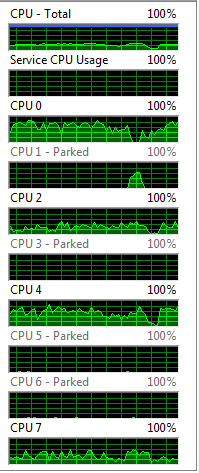
-
SMR 510RR
- Posts: 2526
- Joined: Sun Apr 08, 2012 6:36 am
- Team: Privateer
Re: Best hard drive setup?
Sounds like there is something funny going on.
You can try switching to the high performance power profile so that windows will not "park" CPUs, actually I have never seen that before haha. I would close all unused programs and extra services just to see if it helps. You can also check in something like MSI afterburner or another utility like that to see how hard your GPU is working.
You can try switching to the high performance power profile so that windows will not "park" CPUs, actually I have never seen that before haha. I would close all unused programs and extra services just to see if it helps. You can also check in something like MSI afterburner or another utility like that to see how hard your GPU is working.