
ok, I know how badly noobs get ripped apart for asking questions that have been answered time and time again, so if you have a problem with answering my questions here, I can happily email JLV about this and see what he has to say. Otherwise here it goes.
My MX Sim application stopped allowing me to access the editor when I updated to 1.3 and no matter what I have done since it does NOT allow me to get to the editor screen (Yes, I'm pressing TAB, yes, I've been through the track editing tutorial 50 times), the command path is exact, the blank track is installed, but somehow it still won't work.
I just tried to install the game from scratch and the old tracks are labeled on the track selection screen so obviously it didn't fully uninstall everything and I can't find anything that would have caused this to happen. I went through and deleted the personal folder, etc. and still come up with what looks like a blend of the old install and the new one. How do I just wipe this clean and start over? I am totally lost as to how this is labeling the old tracks and not loading them or for that matter why the editor isn't working what so ever.
Please, I'm begging you guys, how the hell do I get a totally "clean" install of this game? What do I have to delete?
All kinds of problems
-
yzmxer608
- Posts: 15352
- Joined: Mon Dec 29, 2008 4:30 am
- Team: SYS
- Location: Wisconsin, U.S.A
Re: All kinds of problems
To fully uninstall the game use the normal uninstaller. After that (probably should back-up all of your tracks and skins etc.) delete your personal folder and the MXS install folder (if there was anything "extra" added in those folders will not be deleted after the uninstaller runs). After that you can run a reg cleaner if you would like, but I never had any problems with MXS and registry entries (http://ccleaner.com works pretty good).
TeamHavocRacing wrote:If I had a nickel for every time someone asked for this, I would have a whole shitload of nickels.
-
GrimmRider
- Posts: 30
- Joined: Fri Jul 03, 2009 10:12 pm
Re: All kinds of problems
That cleaner program is very powerful, helped out tons. Thank you! 
I'm still running into the problem of the track files showing up though. I deleted a TON of folders containing the MX stuff and still get it. I still can't get the editor to work either. I'm about to give up on MX Sim at this point, it's getting so damn frustrating to think I have it, and then it doesn't work.
I've deleted everything and thought I was getting a clean install and it just keeps loading up the old track names, I got it to a point where it only shows about half the tracks I had installed previously, the editor no matter what I do will not load from the TAB key. I'm at a loss for an answer at this point. It seems my computer is holding onto some kind of information that is being refrenced when I start MX.exe. I just can't come up with a good reason for it to be doing this. I'm about to back up the nessesary stuff on my HD and just wipe the thing clean and start over from scratch on this computer.
My brother has been running into issues with his copy where it won't load tracks, less and less tracks are loading, at first his editor worked and now it's doing the same thing as mine. I just can't figure this out. I really enjoyed making personal tracks (I'm not too good at it but it was fun, most of the fun of the sim for me as I am not all that good at riding on it) so this is really a bummer for me to not be able to fix whatever I screwed up on the game.
Any other suggestions are more than welcome, thanks for taking the time to help out.
-Grimm
I'm still running into the problem of the track files showing up though. I deleted a TON of folders containing the MX stuff and still get it. I still can't get the editor to work either. I'm about to give up on MX Sim at this point, it's getting so damn frustrating to think I have it, and then it doesn't work.
I've deleted everything and thought I was getting a clean install and it just keeps loading up the old track names, I got it to a point where it only shows about half the tracks I had installed previously, the editor no matter what I do will not load from the TAB key. I'm at a loss for an answer at this point. It seems my computer is holding onto some kind of information that is being refrenced when I start MX.exe. I just can't come up with a good reason for it to be doing this. I'm about to back up the nessesary stuff on my HD and just wipe the thing clean and start over from scratch on this computer.
My brother has been running into issues with his copy where it won't load tracks, less and less tracks are loading, at first his editor worked and now it's doing the same thing as mine. I just can't figure this out. I really enjoyed making personal tracks (I'm not too good at it but it was fun, most of the fun of the sim for me as I am not all that good at riding on it) so this is really a bummer for me to not be able to fix whatever I screwed up on the game.
Any other suggestions are more than welcome, thanks for taking the time to help out.
-Grimm
-
GrimmRider
- Posts: 30
- Joined: Fri Jul 03, 2009 10:12 pm
Re: All kinds of problems
 Holy crap man!! I just noticed your from Wisconsin! Haha! I'm from the Lake Wisconsin/Madison area! Got up to Deracuse MX park over the summer and loved it! Started out on dirt about 8 years ago and no matter what I do the draw to the sand keeps me coming back from street bikes to rock the knobbies.
 Again, thanks for the help bro! I appreciate it alot!
-
yzmxer608
- Posts: 15352
- Joined: Mon Dec 29, 2008 4:30 am
- Team: SYS
- Location: Wisconsin, U.S.A
Re: All kinds of problems
Hmmmm, Vista, 7 or XP?
XP: C:\Documents and Settings\YOURNAME\Local Settings\Application Data\MX Simulator
Vista/7: C:\Users\USERNAME\AppData\Local\MX Simulator
Make sure the MX Simulator folder in that location is deleted (it's the personal folder, just making sure you are deleting the right folder). All tracks and your config is in there. If that's deleted there shouldn't be anything that would make the track names show in game on a fresh install.
Cool, I'm in Milwaukee but I ride at Aztalan and sometimes Pine Ridge. Never been to Deracuse before.
XP: C:\Documents and Settings\YOURNAME\Local Settings\Application Data\MX Simulator
Vista/7: C:\Users\USERNAME\AppData\Local\MX Simulator
Make sure the MX Simulator folder in that location is deleted (it's the personal folder, just making sure you are deleting the right folder). All tracks and your config is in there. If that's deleted there shouldn't be anything that would make the track names show in game on a fresh install.
Cool, I'm in Milwaukee but I ride at Aztalan and sometimes Pine Ridge. Never been to Deracuse before.
TeamHavocRacing wrote:If I had a nickel for every time someone asked for this, I would have a whole shitload of nickels.
-
GrimmRider
- Posts: 30
- Joined: Fri Jul 03, 2009 10:12 pm
Re: All kinds of problems
Cool, thanks, I do believe I deleted the personal folder from that location as per JLV's tutorial on track editing but I will go back through it today and see what I can come up with, again, thanks for the help.
I have a buddy that used to ride (never raced) at Aztalan, I've never been to Pine Ridge either and I have a small group with modern dirt machines to go play with this season. I found Dyracuse to be what I as a dirt rider calls "home" as it's very deep sand and I ride vintage bikes. My first trip there over last season was on a 70's Suzuki TS185 with a new dirt knob on the front and a totally bald and dry rotted rear. The supercross practice track, the thin, winding enduro/scramble trails, and the motocross track are a total blast even on outdated if not junk equipment. Lotsa fun.
I have a buddy that used to ride (never raced) at Aztalan, I've never been to Pine Ridge either and I have a small group with modern dirt machines to go play with this season. I found Dyracuse to be what I as a dirt rider calls "home" as it's very deep sand and I ride vintage bikes. My first trip there over last season was on a 70's Suzuki TS185 with a new dirt knob on the front and a totally bald and dry rotted rear. The supercross practice track, the thin, winding enduro/scramble trails, and the motocross track are a total blast even on outdated if not junk equipment. Lotsa fun.
-
GrimmRider
- Posts: 30
- Joined: Fri Jul 03, 2009 10:12 pm
Re: All kinds of problems
Oh yeah, damn lack of editing posts, I'm on XP SP2.
-
GrimmRider
- Posts: 30
- Joined: Fri Jul 03, 2009 10:12 pm
Re: All kinds of problems

Ok, still having the same problems, tracks that are NOT installed are still showing up and the editor is still not functioning, I can hit the tab key ten trillion times and it just keeps switching view. I deleted the personal folder, tracks are still showing up, not as many, but they are still showing up.
I give up, if or when (I have no money for it) I get a new computer I will get back to MX Simulator, but, see'ing as only one person was willing to give it a shot to help out here and I am at a loss myself I'll just give up. I'll put MX Sim back on the shelf with the rest of the programs and games I have and wait until I have a computer capable of running it without these problems.
Dissapointed is the least of the feelings I have about this. I really likes this sim alot and the lack of support is rather un-nerving. Well, back to GP Bikes where the community support is strong and the physics are alright (but not half as good as MX). Oh well, thanks for the help, maybie I'll be back when I can sort this out.
-Grimm
-
jlv
- Site Admin
- Posts: 15461
- Joined: Fri Nov 02, 2007 5:39 am
- Team: No Frills Racing
- Contact:
Re: All kinds of problems
I would have answered, but I would have just been repeating YZ. There are two places MX Sim looks for tracks, the install folder, which all users on the system share, and the personal folder, which is specific to each user.
The install folder defaults to "C:\Program Files\MX Simulator". It will always contain a file named zzzz.saf, so a system wide search for "zzzz.saf" should find your install folder(s).
The personal folder is "%LOCALAPPDATA%\MX Simulator". Each account on your system will have one of these, so if you're using multiple accounts that could be the problem.
Probably the easiest thing to do would be to uninstall and then search your system for folders named "MX Simulator" and delete them. Make sure you have hidden folders enabled in your search.
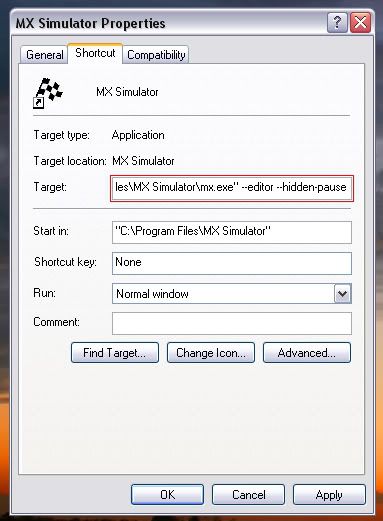
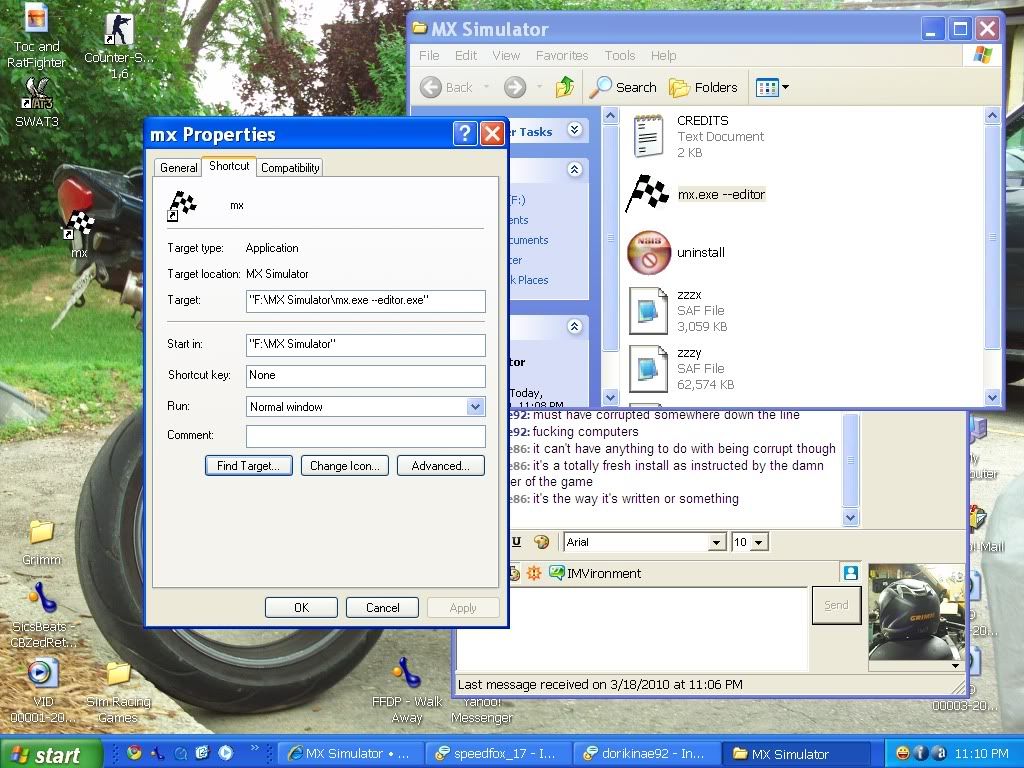
As for the editor, it's hard to say what's wrong without seeing a screenshot of the shortcut properties.
The install folder defaults to "C:\Program Files\MX Simulator". It will always contain a file named zzzz.saf, so a system wide search for "zzzz.saf" should find your install folder(s).
The personal folder is "%LOCALAPPDATA%\MX Simulator". Each account on your system will have one of these, so if you're using multiple accounts that could be the problem.
Probably the easiest thing to do would be to uninstall and then search your system for folders named "MX Simulator" and delete them. Make sure you have hidden folders enabled in your search.
As for the editor, it's hard to say what's wrong without seeing a screenshot of the shortcut properties.
Josh Vanderhoof
Sole Proprietor
jlv@mxsimulator.com
If you email, put "MX Simulator" in the subject to make sure it gets through my spam filter.
Sole Proprietor
jlv@mxsimulator.com
If you email, put "MX Simulator" in the subject to make sure it gets through my spam filter.
-
GrimmRider
- Posts: 30
- Joined: Fri Jul 03, 2009 10:12 pm
Re: All kinds of problems
So now I feel even more so like an idiot for starting a thread, but, I suppose it's here, ya'all are willing to help, may as well give it a shot to fix this.
I have what I think is a clean install. After updating to 1.3 a few weeks ago, I lost the editor function and nothing I have done has gotten it back.
I"m not sure how to embed screens so I uploaded them to photobucket. I can't edit posts, so it will be links if your willing to deal with them, here they are,
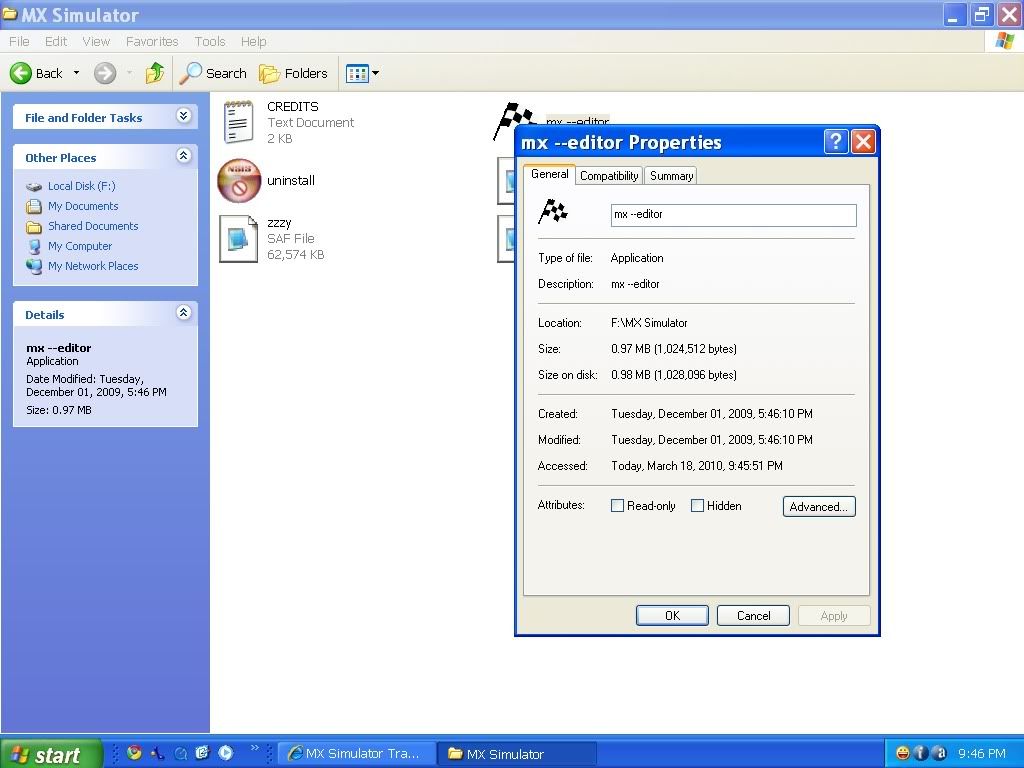
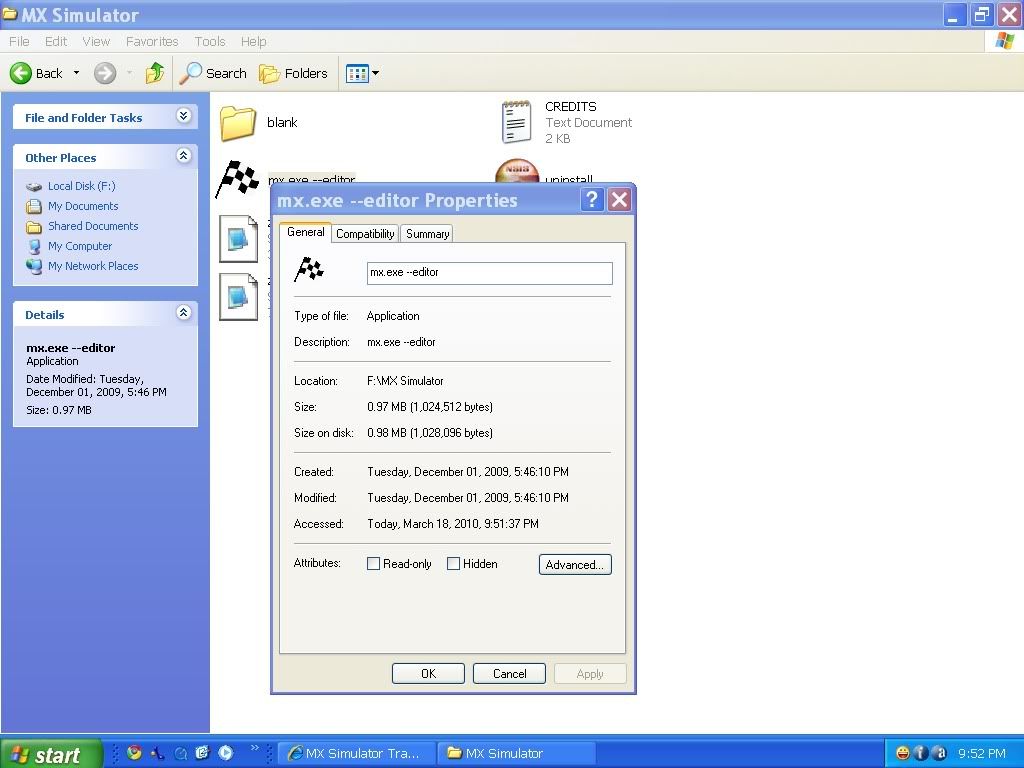
Root folder, both attempts,
http://i645.photobucket.com/albums/uu17 ... editor.jpg
http://i645.photobucket.com/albums/uu17 ... ditor1.jpg
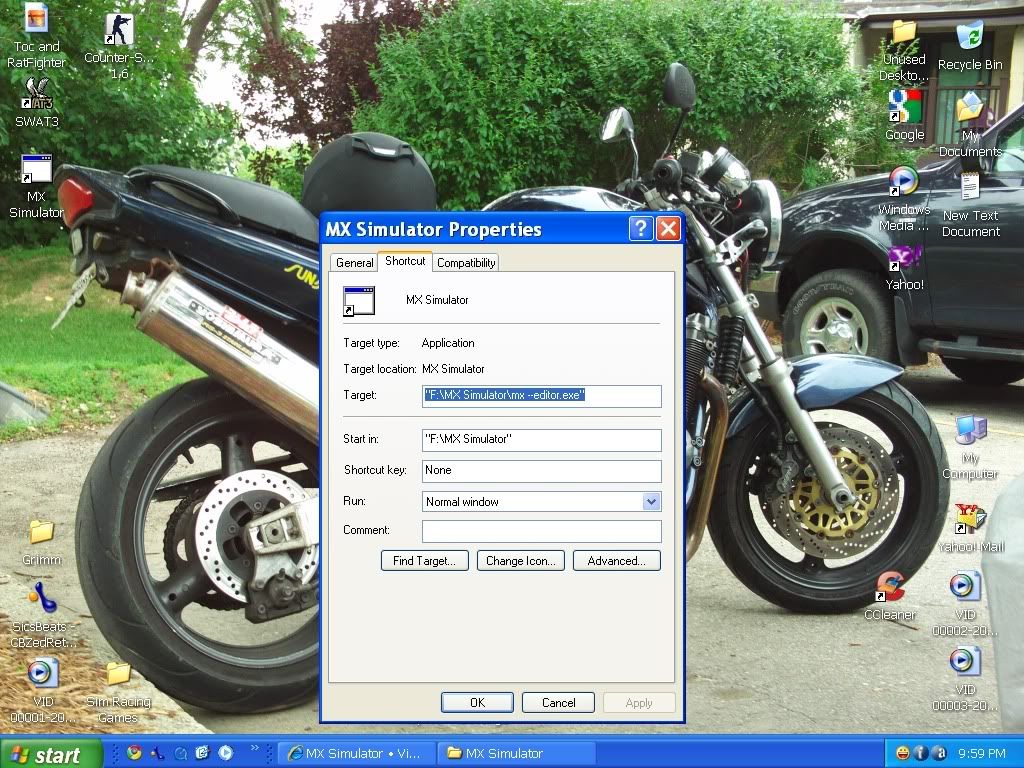
Then the attempt at the shortcut to see if that works, still no action,
(yeah, that is a pic of my old Bandit 1200 on my desktop... crashed a few years ago and been riding the dirt since)
http://i645.photobucket.com/albums/uu17 ... MXedit.jpg
The game is back to fully functional, I just can't seem to get the editor to work again, been through the FAQ thread a few times, tried mx --editor mx.exe --editor mx.exe'' --editor and a few others and still nothing. I must be dumber than I look seeing as the threads I found and the FAQ all seem very simple and strait forward.
Again, thanks so much for the help and bearing with my inability to figure this out as it has been covered time and time again.
I have what I think is a clean install. After updating to 1.3 a few weeks ago, I lost the editor function and nothing I have done has gotten it back.
I"m not sure how to embed screens so I uploaded them to photobucket. I can't edit posts, so it will be links if your willing to deal with them, here they are,
Root folder, both attempts,
http://i645.photobucket.com/albums/uu17 ... editor.jpg
http://i645.photobucket.com/albums/uu17 ... ditor1.jpg
Then the attempt at the shortcut to see if that works, still no action,
(yeah, that is a pic of my old Bandit 1200 on my desktop... crashed a few years ago and been riding the dirt since)
http://i645.photobucket.com/albums/uu17 ... MXedit.jpg
The game is back to fully functional, I just can't seem to get the editor to work again, been through the FAQ thread a few times, tried mx --editor mx.exe --editor mx.exe'' --editor and a few others and still nothing. I must be dumber than I look seeing as the threads I found and the FAQ all seem very simple and strait forward.
Again, thanks so much for the help and bearing with my inability to figure this out as it has been covered time and time again.
-
jlv
- Site Admin
- Posts: 15461
- Joined: Fri Nov 02, 2007 5:39 am
- Team: No Frills Racing
- Contact:
Re: All kinds of problems
Nothing wrong with starting a thread. That's what the forum is here for.
The target should be like this:
"F:\MX Simulator\mx.exe" --editor
I would have thought that the shortcut that you put in the install folder would have worked too when you double click it.
Also, don't put the blank track in the install folder. When you save, the files will go in the personal folder. You want to open All Programs / MX Simulator / MX Simulator Personal folder and drag the blank track there.
The target should be like this:
"F:\MX Simulator\mx.exe" --editor
I would have thought that the shortcut that you put in the install folder would have worked too when you double click it.
Also, don't put the blank track in the install folder. When you save, the files will go in the personal folder. You want to open All Programs / MX Simulator / MX Simulator Personal folder and drag the blank track there.
Josh Vanderhoof
Sole Proprietor
jlv@mxsimulator.com
If you email, put "MX Simulator" in the subject to make sure it gets through my spam filter.
Sole Proprietor
jlv@mxsimulator.com
If you email, put "MX Simulator" in the subject to make sure it gets through my spam filter.
-
GrimmRider
- Posts: 30
- Joined: Fri Jul 03, 2009 10:12 pm
Re: All kinds of problems
Ok, I'm still unable to access the editor, I'm about ready to give up on this. 
Screen of the current status,
http://i645.photobucket.com/albums/uu17 ... ingwtf.jpg
I'm not sure how to add the quotations in the line you have listed as how it should look. This is really getting on my nerves becuase I am sure it's something I am doing wrong and it seems so damn simple. I keep reading other threads saying it's so easy, just add this to the line, but it doesn't seem so simple, it took a bunch of messing around with it to get it to work the first time and I havn't the slightest clue how I got it to work before.
Just for refrence, this is how it looks,
"F:\MX Simulator\mx.exe --editor.exe"
How you have it written,
"F:\MX Simulator\mx.exe" --editor
I can't get it to not have the .exe at the end or the quotation after mx.exe.
Screen of the current status,
http://i645.photobucket.com/albums/uu17 ... ingwtf.jpg
I'm not sure how to add the quotations in the line you have listed as how it should look. This is really getting on my nerves becuase I am sure it's something I am doing wrong and it seems so damn simple. I keep reading other threads saying it's so easy, just add this to the line, but it doesn't seem so simple, it took a bunch of messing around with it to get it to work the first time and I havn't the slightest clue how I got it to work before.
Just for refrence, this is how it looks,
"F:\MX Simulator\mx.exe --editor.exe"
How you have it written,
"F:\MX Simulator\mx.exe" --editor
I can't get it to not have the .exe at the end or the quotation after mx.exe.
-
DJ99X
- Posts: 15524
- Joined: Tue Jan 15, 2008 11:36 am
- Location: Land Down Under
-
jlv
- Site Admin
- Posts: 15461
- Joined: Fri Nov 02, 2007 5:39 am
- Team: No Frills Racing
- Contact:
Re: All kinds of problems
Never heard of windows preventing users from editing in the target box before.
As a workaround, try saving this bat script in F:\MX Simulator and double clicking it to run the editor.
As a workaround, try saving this bat script in F:\MX Simulator and double clicking it to run the editor.
Josh Vanderhoof
Sole Proprietor
jlv@mxsimulator.com
If you email, put "MX Simulator" in the subject to make sure it gets through my spam filter.
Sole Proprietor
jlv@mxsimulator.com
If you email, put "MX Simulator" in the subject to make sure it gets through my spam filter.
-
DJ99X
- Posts: 15524
- Joined: Tue Jan 15, 2008 11:36 am
- Location: Land Down Under
Re: All kinds of problems
Wait. Is that the exe that you called 'mx.exe --editor' in the background? If so, theres your problem. Just call it 'mx', not 'mx.exe --editor'
EDIT: Yeah, thats your prob. I bet
"F:\MX Simulator\mx.exe --editor.exe" --editor
would work
EDIT: Yeah, thats your prob. I bet
"F:\MX Simulator\mx.exe --editor.exe" --editor
would work