
Normal Map questions.
-
Boblob801
- Posts: 3998
- Joined: Mon Nov 16, 2009 4:59 am
- Team: <3 Andy
- Location: New Zealand
- Contact:
Normal Map questions.
In mxs I understand that the red channel is inverted. Does it use the blue channel? I understand that shader engines recalculate the blue channel, is mxs one of those programs?
Hi
-
Boblob801
- Posts: 3998
- Joined: Mon Nov 16, 2009 4:59 am
- Team: <3 Andy
- Location: New Zealand
- Contact:
Re: Normal Map questions.
I seem to have destroyed my thought process. In Mxs, the red channel faces leftward, correct? The green channel upward, yes? So if i wanted something to pop out I use said theory but if I wanted it to go inward I would invert both channels? Also I have assumed we don't use the blue channel as its blank.
Hi
-
jlv
- Site Admin
- Posts: 15386
- Joined: Fri Nov 02, 2007 5:39 am
- Team: No Frills Racing
- Contact:
Re: Normal Map questions.
The blue channel has to be correct, although the game does normalize the vectors, so it will look the same if the vectors aren't unit length.
Josh Vanderhoof
Sole Proprietor
jlv@mxsimulator.com
If you email, put "MX Simulator" in the subject to make sure it gets through my spam filter.
Sole Proprietor
jlv@mxsimulator.com
If you email, put "MX Simulator" in the subject to make sure it gets through my spam filter.
-
Boblob801
- Posts: 3998
- Joined: Mon Nov 16, 2009 4:59 am
- Team: <3 Andy
- Location: New Zealand
- Contact:
Re: Normal Map questions.
What about my second part, also does direction account for anything, here is an example.
In the picture I have made the front stick out but the back appears to curve in but this is only because it will be rotated 180 ingame, so in theory when I rotated the image the back should look the same as the front, just like in the pic. But does it work like that in the game?
Keep in mind both sides are identical except the right is rotated about 180degress

In the picture I have made the front stick out but the back appears to curve in but this is only because it will be rotated 180 ingame, so in theory when I rotated the image the back should look the same as the front, just like in the pic. But does it work like that in the game?
Keep in mind both sides are identical except the right is rotated about 180degress
Hi
-
Boblob801
- Posts: 3998
- Joined: Mon Nov 16, 2009 4:59 am
- Team: <3 Andy
- Location: New Zealand
- Contact:
Re: Normal Map questions.
Ok guys meet "Box Head" he's a nice guy but he's pretty confusing. Now like most people there's more than on side to box head and although both sides are actually the same when you see his second side in another light it doesn't look the same at all.
Open him in full screen.

Open him in full screen.
Hi
-
Boblob801
- Posts: 3998
- Joined: Mon Nov 16, 2009 4:59 am
- Team: <3 Andy
- Location: New Zealand
- Contact:
Re: Normal Map questions.
This is it, what you guys have all been waiting for. THE TRUTH. The picture speaks for itself, the grayscale is just what it looks like in the channels. So if you got light in the top right for both your red and green channel its going to dent in but if you got light in the bottom left its going to pop out.

Dear JLV, will this stuff work??
Normal Map Compression
Normal maps can take up a lot of memory. Compression can reduce the size of a map to 1/4 of what it was uncompressed, which means you can either increase the resolution or you can use more maps.
Usually the compression method is to throw away the Blue channel, because this can be re-computing at minimal cost in the shader code. Then the bitmap only has to store two color channels, instead of four (red, green, blue, and alpha).
The article Real-Time Normal Map DXT Compression (PDF) from id software and NVIDIA is an excellent introduction to compression.
DXT5nm Compression
DXT5nm is the same file format as DXT5 except before compression the red channel is moved into the alpha channel, the green channel is left as-is, and the red and blue channels are blanked with the same solid color. This re-arranging of the color channels is often called swizzling.
The Green and Alpha channels are used because in the DXT format they are compressed using somewhat higher bit depths than the Red and Blue channels. Red and Blue have to be filled with the same solid color because DXT uses a compression system that compares differences between the three color channels. If you try to store some kind of texture in Red and/or Blue (specular power, height map, etc.) then the compressor will create more compression artifacts because it has to compare all three channels.
There are some options in the NVIDIA DXT compressor that help reduce the artifacts if you want to add texture to the Red or Blue channels. The artifacts will be greater than if you keep Red and Blue empty, but it might be a tradeoff worth making. Some notes about this on the NVIDIA Developer Forums.
DXT1 Compression
DXT1 is also used sometimes for tangent-space normal maps, because it is half the size of a DXT5. The downside though is that it causes many more compression artifacts, so much so that most people end up not using it.
The blog post I like spilled beans! by Christer Ericson has a section about Capcom's clever use of DXT1 and DXT5.
3Dc Compression
3Dc compression is also known as BC5 in DirectX 10. It works similar to DXT5nm, because it only stores the X and Y channels. The difference is it stores both the same way as the DXT5 Alpha channel, which is a slightly higher bit depth than DXT5nm's Green channel. 3Dc yields the best results of any listed algorithm for tangent space normal map compression, and requires no extra processing time or unique hardware. See 3Dc for more information.
A8L8 Compression
The DDS format A8L8 isn't actually compressed, it's just two 8bit grayscale channels (256 grays each). It does save you from having to store all three color channels. Your shader has to recompute the blue channel for it to work. However, A8L8 does not actually save any space in texture memory, it is typically converted to a four-channel 32bit texture when it's sent to the card. This format really only helps save disk space.
Dear JLV, will this stuff work??
Normal Map Compression
Normal maps can take up a lot of memory. Compression can reduce the size of a map to 1/4 of what it was uncompressed, which means you can either increase the resolution or you can use more maps.
Usually the compression method is to throw away the Blue channel, because this can be re-computing at minimal cost in the shader code. Then the bitmap only has to store two color channels, instead of four (red, green, blue, and alpha).
The article Real-Time Normal Map DXT Compression (PDF) from id software and NVIDIA is an excellent introduction to compression.
DXT5nm Compression
DXT5nm is the same file format as DXT5 except before compression the red channel is moved into the alpha channel, the green channel is left as-is, and the red and blue channels are blanked with the same solid color. This re-arranging of the color channels is often called swizzling.
The Green and Alpha channels are used because in the DXT format they are compressed using somewhat higher bit depths than the Red and Blue channels. Red and Blue have to be filled with the same solid color because DXT uses a compression system that compares differences between the three color channels. If you try to store some kind of texture in Red and/or Blue (specular power, height map, etc.) then the compressor will create more compression artifacts because it has to compare all three channels.
There are some options in the NVIDIA DXT compressor that help reduce the artifacts if you want to add texture to the Red or Blue channels. The artifacts will be greater than if you keep Red and Blue empty, but it might be a tradeoff worth making. Some notes about this on the NVIDIA Developer Forums.
DXT1 Compression
DXT1 is also used sometimes for tangent-space normal maps, because it is half the size of a DXT5. The downside though is that it causes many more compression artifacts, so much so that most people end up not using it.
The blog post I like spilled beans! by Christer Ericson has a section about Capcom's clever use of DXT1 and DXT5.
3Dc Compression
3Dc compression is also known as BC5 in DirectX 10. It works similar to DXT5nm, because it only stores the X and Y channels. The difference is it stores both the same way as the DXT5 Alpha channel, which is a slightly higher bit depth than DXT5nm's Green channel. 3Dc yields the best results of any listed algorithm for tangent space normal map compression, and requires no extra processing time or unique hardware. See 3Dc for more information.
A8L8 Compression
The DDS format A8L8 isn't actually compressed, it's just two 8bit grayscale channels (256 grays each). It does save you from having to store all three color channels. Your shader has to recompute the blue channel for it to work. However, A8L8 does not actually save any space in texture memory, it is typically converted to a four-channel 32bit texture when it's sent to the card. This format really only helps save disk space.
Hi
-
jlv
- Site Admin
- Posts: 15386
- Joined: Fri Nov 02, 2007 5:39 am
- Team: No Frills Racing
- Contact:
Re: Normal Map questions.
Looks like you already have it, but here's a sphere baked with the correct coordinates:
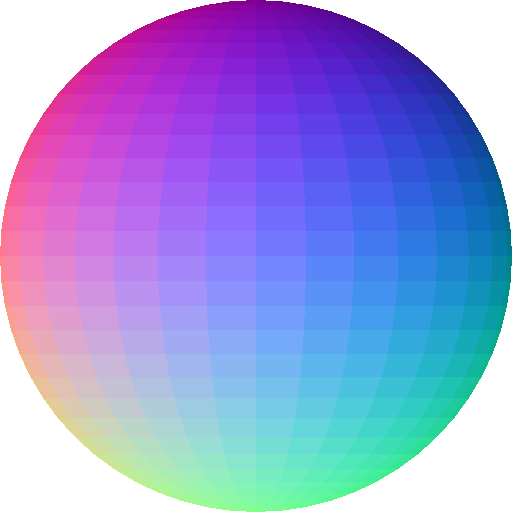
As for compression, all it currently does is use the GL_COMPRESSED_RGB format if requested.
As for compression, all it currently does is use the GL_COMPRESSED_RGB format if requested.
Josh Vanderhoof
Sole Proprietor
jlv@mxsimulator.com
If you email, put "MX Simulator" in the subject to make sure it gets through my spam filter.
Sole Proprietor
jlv@mxsimulator.com
If you email, put "MX Simulator" in the subject to make sure it gets through my spam filter.
-
Kording
- Posts: 1334
- Joined: Sun Nov 08, 2009 12:53 pm
- Team: Privateer
- Location: Germany
Re: Normal Map questions.
Wow thank you. I am so glad I found this thread. Why isnt this in any Tutorial thread yet ? This is literaly the problem I tried to solve for about a year !!
Tennis, Basketball and Baseball all requires one ball
Motocross requires two!
Motocross requires two!