Page 1 of 1

Track dont appear in game (they're unzipped + in personal)

Posted: Mon Apr 13, 2009 10:33 am
by Grosser
Ok my problem is I have downloaded 3 tracks (Red bull suzuki test track, saint jones and blank track). They have all been unzipped with Winzip (full version) and toth the RAR file and the folder are in my MX SIM personal folder. My bike skins are in the same folder, as are my rider skins and they both work in game fine. I own the full version. Where have I gone wrong ? As far as I can see i've followed the written instructions on this forum and watched the youtube video a few times and I dont see how what I'm doing is different. WHY WONT THIS WORK !!! :evil: :evil: :evil:
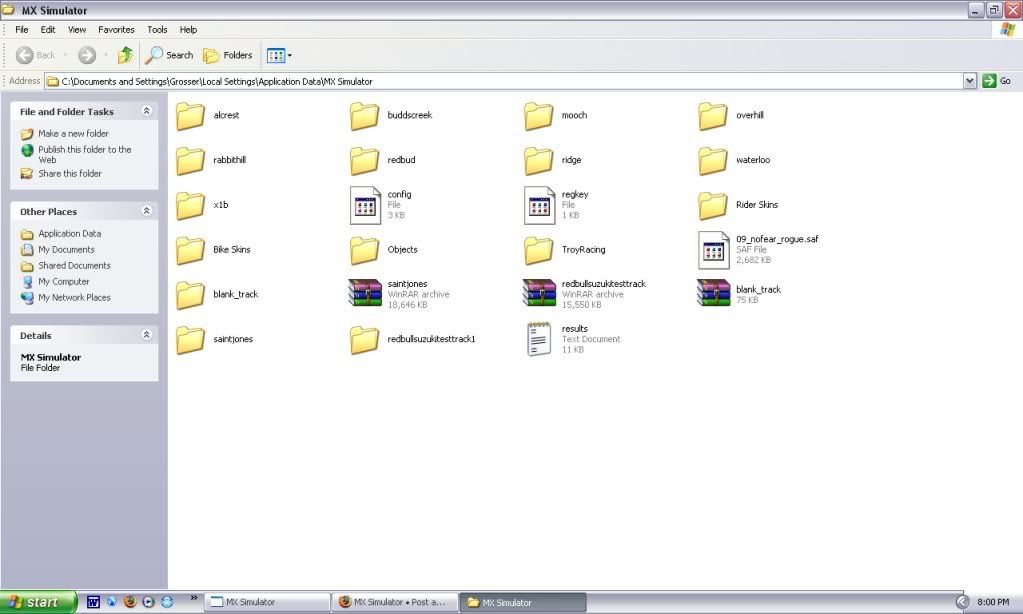
Image
Thats what my MX simulator personal folder looks like.

Re: Track dont appear in game (they're unzipped + in personal)

Posted: Mon Apr 13, 2009 12:04 pm
by yomo
Take out the winrar files not sure if that is anything but it might help.

Re: Track dont appear in game (they're unzipped + in personal)

Posted: Mon Apr 13, 2009 11:27 pm
by ddmx
Make sure that the extracted folder is not in a new folder. If you double click the saintjones folder for instance you shouldn't have to double click another folder to view the contents of the track. The contents of the track should be directly in the first folder. i.e: app data/MX Simulator/saintjones/terrain.png should be a location. not mxsim/saintjones/saintjones/terrain.png. I can already tell this is your problem since the extracted blank track is named blank_track..just like the winrar archive. It should be just named blank.

Re: Track dont appear in game (they're unzipped + in personal)

Posted: Tue Apr 14, 2009 5:43 am
by Grosser
Ahhhh, thanks DDMX you were exactly right. Great, now I can finally try out Washougal 2008 :twisted: Thanks again, problem solved :)