
PC Issues

I've heard conversation coming out of animal pens that is more intelligent than what is going on in here.
Post Reply
Ohagan75
Posts: 3777
Joined: Mon Jan 23, 2012 3:17 am
Team: Prime Design GFX
Location: Australia
Contact:

PC Issues

Post by Ohagan75 »

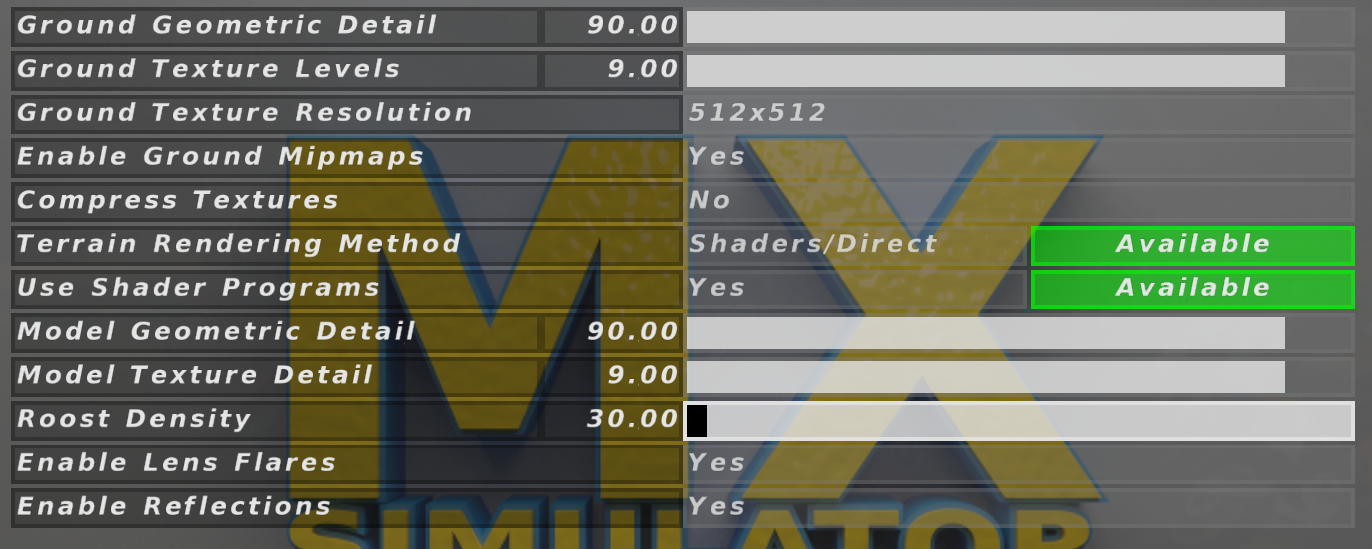
I've been noticing recently that my PC's performance has deteriorated significantly since I got it around a year and a half ago. When I got this PC I could run the game at 125 fps with the following settings Image
and I could load into servers in a matter of seconds. Now when I try to run those settings I get 20fps even with only 5-10 guys in a server with default replacement skins.

Tonight it finally pissed me off enough to ask some people about what it could possibly be after load times in 02 were around the 25 second mark after every race. Jay suggested it might be an issue with my registry, and Penwell suggested creating custom settings in the Nvidia control panel for Mxs to maximize it's peformance. After some changes I have it back up to 125 frames, with shaders on, but my settings are still nowhere near the settings I could run before.

Basically all I am wondering is what could be the cause for this performance drop.
Image
Donate if you like My Creations
Pumaxcs
Posts: 13227
Joined: Sat Dec 15, 2007 11:50 pm
Team: Kyle/Luiz
Location: Western, Kentucky

Re: PC Issues

Post by Pumaxcs »

Heat throttling? Is it stock clocks or did you OC? Background programs?
Image
Everytime you post something stupid, a baby gets punched in the face. Please be smart, for the children.
MXS Cares
jlv wrote: Thu Nov 05, 2020 1:09 am Pumaxcs would know better than I do.
Hi Im Skyqe
Posts: 3020
Joined: Wed Dec 22, 2010 4:52 pm
Team: wat

Re: PC Issues

Post by Hi Im Skyqe »

Turn off lens flares.
Pumaxcs
Posts: 13227
Joined: Sat Dec 15, 2007 11:50 pm
Team: Kyle/Luiz
Location: Western, Kentucky

Re: PC Issues

Post by Pumaxcs »

Put resolution to x256 and have Shaders/copy
Image
Everytime you post something stupid, a baby gets punched in the face. Please be smart, for the children.
MXS Cares
jlv wrote: Thu Nov 05, 2020 1:09 am Pumaxcs would know better than I do.
Ohagan75
Posts: 3777
Joined: Mon Jan 23, 2012 3:17 am
Team: Prime Design GFX
Location: Australia
Contact:

Re: PC Issues

Post by Ohagan75 »

Thanks for the suggestions guys. I'm still curious as to what has caused me to need to run way lower settings to achieve the same fps.

Also puma it is using stock clocks, and I have background programs up yes, but they never caused any issues when I first got the computer.
Image
Donate if you like My Creations
SMR 510RR
Posts: 2526
Joined: Sun Apr 08, 2012 6:36 am
Team: Privateer

Re: PC Issues

Post by SMR 510RR »

Is it happening globally on all tracks/models? Maybe you tweaked the settings by accident?

Install CPUz and coretemp and see if you can get it to overheat, you will see the multiplier in CPUz drop.
Ohagan75
Posts: 3777
Joined: Mon Jan 23, 2012 3:17 am
Team: Prime Design GFX
Location: Australia
Contact:

Re: PC Issues

Post by Ohagan75 »

yeah it's happening globally. I'll give those a shot. Thanks
Image
Donate if you like My Creations
Post Reply