
Computer lagging as of yesterday
-
Ddavis
- Posts: 17992
- Joined: Wed Sep 28, 2011 1:02 am
Computer lagging as of yesterday
Not sure what it is. My PC crashed during an update, and I got it fixed. The computer shop essentially backed up all of my personal files, made my computer bone stock like its new, then reinstalled my files. I had to redo everything, but I noticed that CSGO specifically is stuttering and lagging a LOT. I turned vsync off, I have good internet, and my specs are good on my computer. I'm just lost at why my game is lagging SO much, I've had this PC for years now and CS for over a year and never had one issue with lag like this. I used to have this sort of lag come to think of it, but restarting my PC would usually fix it, however its not fixing it this time. I've tried lowering my 3D settings, tried lowering settings in game, updating my graphic card drivers, everything you could think of and nothing is working. Is there anything that might be obvious that I haven't done?
-
tyskorn
- Posts: 6491
- Joined: Sun Jan 11, 2009 5:52 pm
- Team: Adept MX Graphics
- Location: Utah, USA
Re: Computer lagging as of yesterday
Is everything up to date? You say you redid everything, but what does that mean? I've never opened the GeForce Experience without my card plugged it, but if you go in there and check My Rig I imagine you could easily find out if your graphics card is being detected, like Wahlmat asked you. I'm not an expert by any means, but these are the things I would do. Puma will probably be of more assistance if/when he sees this post.
-
Ddavis
- Posts: 17992
- Joined: Wed Sep 28, 2011 1:02 am
Re: Computer lagging as of yesterday
When I got my PC back I saw an antivirus I didn't recognize so I uninstalled it, assuming that I'll continue to run Windows Defender. I tried doing a scan this evening and it says Windows Defender has been disabled from my PC  I'm reinstalling the antivirus I uninstalled. Would that create lag? Playing CS without an antivirus program on your computer? My game was fine the day I got my PC back, but come to think of it now, it's been lagging since I removed the program. Hmm
I'm reinstalling the antivirus I uninstalled. Would that create lag? Playing CS without an antivirus program on your computer? My game was fine the day I got my PC back, but come to think of it now, it's been lagging since I removed the program. Hmm-
tyskorn
- Posts: 6491
- Joined: Sun Jan 11, 2009 5:52 pm
- Team: Adept MX Graphics
- Location: Utah, USA
Re: Computer lagging as of yesterday
Running programs without an antivirus wouldn't make you lag unless you had a virus that was making you lag. I use the free version of Bitdefender and it's worked really well for me. Is everything actually up to date though? Windows and graphics drivers?
-
Ddavis
- Posts: 17992
- Joined: Wed Sep 28, 2011 1:02 am
Re: Computer lagging as of yesterday
I think so, but I'm not sure if there's any drivers I didn't think of that are causing me to lag.
-
Ddavis
- Posts: 17992
- Joined: Wed Sep 28, 2011 1:02 am
Re: Computer lagging as of yesterday
Uninstalling CSGO
It's so laggy that it's literally unplayable. It's extremely jittery and skips every frame or so when I'm running or shooting. I'm ripping my hair out trying to figure this fucking shit out
It's so laggy that it's literally unplayable. It's extremely jittery and skips every frame or so when I'm running or shooting. I'm ripping my hair out trying to figure this fucking shit out
-
SMR 510RR
- Posts: 2526
- Joined: Sun Apr 08, 2012 6:36 am
- Team: Privateer
Re: Computer lagging as of yesterday
update your graphics drivers, that is the first step.
-
Ddavis
- Posts: 17992
- Joined: Wed Sep 28, 2011 1:02 am
Re: Computer lagging as of yesterday
I did update my graphics card drivers.
-
Ddavis
- Posts: 17992
- Joined: Wed Sep 28, 2011 1:02 am
Re: Computer lagging as of yesterday
Every time I try to join a game it says "Failed to join a match" or whatever, and I usually need to restart steam to get it to work. Once I'm in game, my ping is steady at 25-30, but my frames will go from 90 to 150 to 200 to 80 to 200.. I've NEVER had FPS spiking issues on this PC until now, just wondering if it could be firewall, graphics card 3d settings, in game settings, audio settings/drivers, etc
-
Ddavis
- Posts: 17992
- Joined: Wed Sep 28, 2011 1:02 am
Re: Computer lagging as of yesterday
My processor is Intel Core i5-4570 CPU @ 3.20GHz and my graphics card is a GeForce GTX 760. So my PC itself is fine, and my dad is paying for the highest level of internet connection just to hear me quit bitching about lag  So I don't know where the lag is coming from
So I don't know where the lag is coming from-
SMR 510RR
- Posts: 2526
- Joined: Sun Apr 08, 2012 6:36 am
- Team: Privateer
Re: Computer lagging as of yesterday
Firewall usually lets something through or it doesn't, its not going to cause this type of issues.
It could be settings but from what I have seen of the game it wouldn't really make sense to have spikes like that.
If anything it should perform better than before with a clean install, I would just update all the drivers you can find and check temps as well.
Lag is one thing slow frame rates is often called lag but it is not lag.
You can test your internet connection other ways like running a speed test or even better downloading a big file for at least a few minutes. Then you can run a benchmark in another game that has that feature or something like Passmark to see if it is a performance issue with the computer itself.
It could be settings but from what I have seen of the game it wouldn't really make sense to have spikes like that.
If anything it should perform better than before with a clean install, I would just update all the drivers you can find and check temps as well.
Lag is one thing slow frame rates is often called lag but it is not lag.
You can test your internet connection other ways like running a speed test or even better downloading a big file for at least a few minutes. Then you can run a benchmark in another game that has that feature or something like Passmark to see if it is a performance issue with the computer itself.
-
Ddavis
- Posts: 17992
- Joined: Wed Sep 28, 2011 1:02 am
Re: Computer lagging as of yesterday
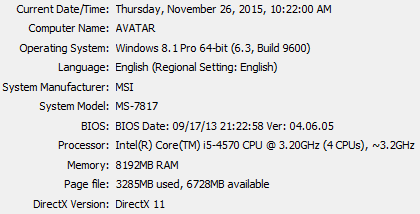
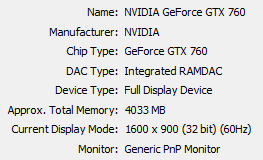
Do I download 32 bit or 64 bit for the graphics card based on these specs? I mean, I used to run CSGO on all high settings and NEVER have one issue with lag.
-
Ddavis
- Posts: 17992
- Joined: Wed Sep 28, 2011 1:02 am
Re: Computer lagging as of yesterday
The graphics themselves tho in game look really terrible, jagged edges and nothing is smooth. The models, the gameplay, the environment, nothing.
-
SMR 510RR
- Posts: 2526
- Joined: Sun Apr 08, 2012 6:36 am
- Team: Privateer
Re: Computer lagging as of yesterday
64, just install nvidia experience or whatever and let it upgrade and while you are in there optimize the settings for CSGO and see if that helps.
-
Pumaxcs
- Posts: 13228
- Joined: Sat Dec 15, 2007 11:50 pm
- Team: Kyle/Luiz
- Location: Western, Kentucky
Re: Computer lagging as of yesterday
900p monitor at 60Hz? How do you feel the difference between 200-80?
Download CPU/GPU-Z and monitor the usage rate of both. Also wouldn't hurt to do a scan with some other virus things, Malwarebytes and ComboFix are two of my favorites to use.
Download CPU/GPU-Z and monitor the usage rate of both. Also wouldn't hurt to do a scan with some other virus things, Malwarebytes and ComboFix are two of my favorites to use.
