
3DMax+Blender discussion
-
magnusson
- Posts: 2618
- Joined: Fri Jan 15, 2010 12:38 am
- Team: Wannabe
- Contact:
Re: 3DMax+Blender discussion
yes well i dint get good results whit seams, so i just used smart project on the object that dint work out so well.
My Release's on PureMXSvurbmoto wrote: - Kevin Windham is still a BOSS
-
yzmxer608
- Posts: 15352
- Joined: Mon Dec 29, 2008 4:30 am
- Team: SYS
- Location: Wisconsin, U.S.A
Re: 3DMax+Blender discussion
In blender, I have a bezier curve, I closed it with Alt+C. I don't see it as closed though. When I do close it I can see the gap being filled in, so I know the last and first points are being connected. The shape isn't being filled though  .
.
.TeamHavocRacing wrote:If I had a nickel for every time someone asked for this, I would have a whole shitload of nickels.
-
yzmxer608
- Posts: 15352
- Joined: Mon Dec 29, 2008 4:30 am
- Team: SYS
- Location: Wisconsin, U.S.A
Re: 3DMax+Blender discussion
Disregard that, I figured out you have to be in 2d mode for it.
TeamHavocRacing wrote:If I had a nickel for every time someone asked for this, I would have a whole shitload of nickels.
-
born2ride #771
- Posts: 388
- Joined: Thu Dec 17, 2009 6:29 pm
- Team: Privateer
- Location: France
Re: 3DMax+Blender discussion
why when i clik on BAKE, i have this message: "No images found to bake to" but there is the wireframe.. :S
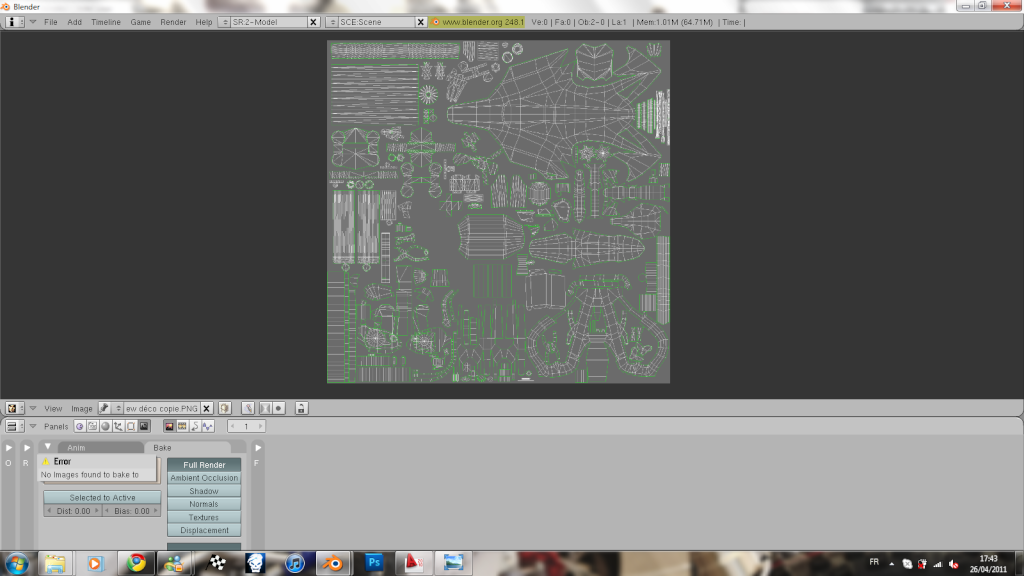

-
stevoktm
- Posts: 1067
- Joined: Fri Dec 11, 2009 5:08 pm
- Location: England
Re: 3DMax+Blender discussion
Have you tried clicking on the image dropdown, then new, then make it 2048x2048 and choose black and click ok then try to bake?born2ride #771 wrote:why when i clik on BAKE, i have this message: "No images found to bake to" but there is the wireframe.. :S
http://i20.servimg.com/u/f20/14/00/00/97/sans_t10.png

-
born2ride #771
- Posts: 388
- Joined: Thu Dec 17, 2009 6:29 pm
- Team: Privateer
- Location: France
Re: 3DMax+Blender discussion
I have made that you said, and now i have this message: "No active object" :/stevoktm wrote:Have you tried clicking on the image dropdown, then new, then make it 2048x2048 and choose black and click ok then try to bake?born2ride #771 wrote:why when i clik on BAKE, i have this message: "No images found to bake to" but there is the wireframe.. :S
http://i20.servimg.com/u/f20/14/00/00/97/sans_t10.png
-
stevoktm
- Posts: 1067
- Joined: Fri Dec 11, 2009 5:08 pm
- Location: England
Re: 3DMax+Blender discussion
did you select the low and then the highpoly model in the correct order?
-
born2ride #771
- Posts: 388
- Joined: Thu Dec 17, 2009 6:29 pm
- Team: Privateer
- Location: France
Re: 3DMax+Blender discussion
no i haven't selected these :/ I 'm not using very good blender... Where is that?stevoktm wrote:did you select the low and then the highpoly model in the correct order?
I prefer PS5 but i can't do this normal map with photoshop :/
-
wheels1758
- Posts: 4132
- Joined: Tue Oct 21, 2008 5:20 pm
- Location: Washington, USA
- Contact:
Re: 3DMax+Blender discussion
Either select low first, then high, then press bake...
Or select high, then low, then press "selected to active", then press bake
Or select high, then low, then press "selected to active", then press bake
-
stevoktm
- Posts: 1067
- Joined: Fri Dec 11, 2009 5:08 pm
- Location: England
Re: 3DMax+Blender discussion
the highpoly is the more detailed model which gets projected on to the lowpoly ingame model.
-
Juanlox123
- Posts: 311
- Joined: Sun Oct 31, 2010 6:05 am
Re: 3DMax+Blender discussion
I think this is already answered, but I tried looking for it without any luck....
Would someone be kind enough to explain to me how exactly I can add a PNG to DJ's YZ in Blender so I can see how the skin looks? Or would you link an explanation? Thanks.
Would someone be kind enough to explain to me how exactly I can add a PNG to DJ's YZ in Blender so I can see how the skin looks? Or would you link an explanation? Thanks.

-
wheels1758
- Posts: 4132
- Joined: Tue Oct 21, 2008 5:20 pm
- Location: Washington, USA
- Contact:
-
magnusson
- Posts: 2618
- Joined: Fri Jan 15, 2010 12:38 am
- Team: Wannabe
- Contact:
Re: 3DMax+Blender discussion
was wondering if anyone could help me to move the bone structure in blender  ?? i have looked over the internet and cant find anything about how to move it...
?? i have looked over the internet and cant find anything about how to move it... My Release's on PureMXSvurbmoto wrote: - Kevin Windham is still a BOSS
-
magnusson
- Posts: 2618
- Joined: Fri Jan 15, 2010 12:38 am
- Team: Wannabe
- Contact:
Re: 3DMax+Blender discussion
never mind that. found it 
My Release's on PureMXSvurbmoto wrote: - Kevin Windham is still a BOSS
-
Kawasakis
- Posts: 6583
- Joined: Sun Mar 16, 2008 5:32 pm
- Contact:

