
2009-11-06 snapshot (updated again and again...)
-
yzmxer608
- Posts: 15352
- Joined: Mon Dec 29, 2008 4:30 am
- Team: SYS
- Location: Wisconsin, U.S.A
Re: 2009-11-06 snapshot (updated again and again...)
Would it work better if you take the shading then put it over a 100% white background then use that as the displacement map?
TeamHavocRacing wrote:If I had a nickel for every time someone asked for this, I would have a whole shitload of nickels.
-
jlv
- Site Admin
- Posts: 15317
- Joined: Fri Nov 02, 2007 5:39 am
- Team: No Frills Racing
- Contact:
Re: 2009-11-06 snapshot (updated again and again...)
Here's a video of someone using sculpt mode to make clothing. Looks easy! 
Josh Vanderhoof
Sole Proprietor
jlv@mxsimulator.com
If you email, put "MX Simulator" in the subject to make sure it gets through my spam filter.
Sole Proprietor
jlv@mxsimulator.com
If you email, put "MX Simulator" in the subject to make sure it gets through my spam filter.
-
DJ99X
- Posts: 15524
- Joined: Tue Jan 15, 2008 11:36 am
- Location: Land Down Under
Re: 2009-11-06 snapshot (updated again and again...)
Its a bunch of drawing and rubbing out 
-
jlv
- Site Admin
- Posts: 15317
- Joined: Fri Nov 02, 2007 5:39 am
- Team: No Frills Racing
- Contact:
Re: 2009-11-06 snapshot (updated again and again...)
It looks like he uses draw or layer to put in the initial contour, then he uses grab to fold the wrinkles over and then uses smooth to smooth it back out.
I'm having a hard time duplicating it myself. I can make wrinkles but it's completely random. I can't make them come out the way I intended. Probably just need more practice.
I'm having a hard time duplicating it myself. I can make wrinkles but it's completely random. I can't make them come out the way I intended. Probably just need more practice.
Josh Vanderhoof
Sole Proprietor
jlv@mxsimulator.com
If you email, put "MX Simulator" in the subject to make sure it gets through my spam filter.
Sole Proprietor
jlv@mxsimulator.com
If you email, put "MX Simulator" in the subject to make sure it gets through my spam filter.
-
Eskwaad
- Posts: 21
- Joined: Mon Jun 09, 2008 10:05 pm
Re: 2009-11-06 snapshot (updated again and again...)
Hi guys
First ,great work JLV.I'm glad to see and interesting evolution in mxs,hope i could test it soon.
About the normalmaps,the sculpting method is the only one (against PS plugin) wich will give the best results.The time you spend to paint a greyscale map and turn it into a normalmap with ps plugin is less productive than the sculpting method,and of course less good ingame.
The PS plugin is good for thin details,create "matter" (fabric,decal bumps etc...) and be use to create normalmaps for each "matter",different setups for the plugin and merge all this normal maps (ps plugin + sculpting) to create the final version.It's a bit of work ,but with practice it's really fast and easy.
Here is a link better than my explanation,this is not really the most detailled tutorial but it covers different technics (3dsmax,Zbrush,PS plugin):
http://www.evermotion.org/tutorials/sho ... ormal-maps
I'll try to post something later ...later doesnt mean soon
First ,great work JLV.I'm glad to see and interesting evolution in mxs,hope i could test it soon.
About the normalmaps,the sculpting method is the only one (against PS plugin) wich will give the best results.The time you spend to paint a greyscale map and turn it into a normalmap with ps plugin is less productive than the sculpting method,and of course less good ingame.
The PS plugin is good for thin details,create "matter" (fabric,decal bumps etc...) and be use to create normalmaps for each "matter",different setups for the plugin and merge all this normal maps (ps plugin + sculpting) to create the final version.It's a bit of work ,but with practice it's really fast and easy.
Here is a link better than my explanation,this is not really the most detailled tutorial but it covers different technics (3dsmax,Zbrush,PS plugin):
http://www.evermotion.org/tutorials/sho ... ormal-maps
I'll try to post something later ...later doesnt mean soon
-
Kawasakis
- Posts: 6583
- Joined: Sun Mar 16, 2008 5:32 pm
- Contact:
Re: 2009-11-06 snapshot (updated again and again...)
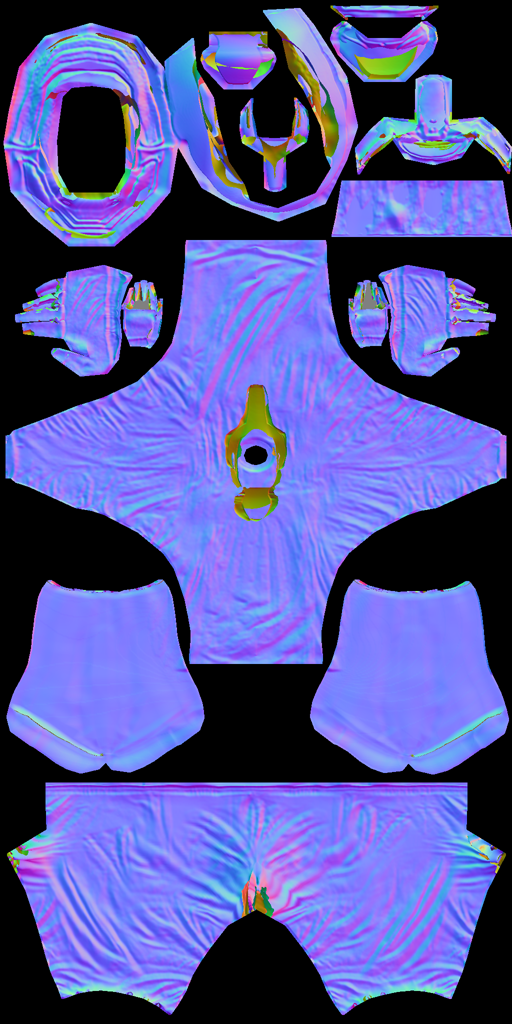
So now we should use this when we make gears/realese them? Pack it together? Or something.
DJ wrote:
MXS Cup Winner
AX MX2 Champion


AX MX2 Champion
-
DJ99X
- Posts: 15524
- Joined: Tue Jan 15, 2008 11:36 am
- Location: Land Down Under
Re: 2009-11-06 snapshot (updated again and again...)
Unless you are going to make a custom one for your skin, no
-
Duckstream
- Posts: 1997
- Joined: Tue Nov 03, 2009 1:06 pm
Re: 2009-11-06 snapshot (updated again and again...)
So i change to use that not the one wilson posted?DJ wrote:


-
Judan
- Posts: 451
- Joined: Tue Dec 02, 2008 7:39 am
Re: 2009-11-06 snapshot (updated again and again...)
his crouch seems to be bump mapped up majorly hah

-
tyskorn
- Posts: 6491
- Joined: Sun Jan 11, 2009 5:52 pm
- Team: Adept MX Graphics
- Location: Utah, USA
Re: 2009-11-06 snapshot (updated again and again...)
I am still confused,do I need to rename the _norm to a skin name_norm?Or just leave it and select the skin I want to use?Hope I make sense. 
-
tyskorn
- Posts: 6491
- Joined: Sun Jan 11, 2009 5:52 pm
- Team: Adept MX Graphics
- Location: Utah, USA
Re: 2009-11-06 snapshot (updated again and again...)
(Sorry for double post)
Nevermind guys,I got it
Nevermind guys,I got it
-
Wes Wamsley
- Posts: 18
- Joined: Thu Oct 29, 2009 1:43 pm
Re: 2009-11-06 snapshot (updated again and again...)
Is it working? lol (watch the vid)
-
DJ99X
- Posts: 15524
- Joined: Tue Jan 15, 2008 11:36 am
- Location: Land Down Under
Re: 2009-11-06 snapshot (updated again and again...)
OK, so I was just comparing normal maps baked in blender vs rendered in photoshop. If the x axis is inverted in photoshop, you get the exact same results
-
jlv
- Site Admin
- Posts: 15317
- Joined: Fri Nov 02, 2007 5:39 am
- Team: No Frills Racing
- Contact:
Re: 2009-11-06 snapshot (updated again and again...)
Now that I think about it, you're right. If something is unwrapped upside down the tangent space transformation will rotate it back since tangent space is mostly the same as texture space. Sorry about that.
Josh Vanderhoof
Sole Proprietor
jlv@mxsimulator.com
If you email, put "MX Simulator" in the subject to make sure it gets through my spam filter.
Sole Proprietor
jlv@mxsimulator.com
If you email, put "MX Simulator" in the subject to make sure it gets through my spam filter.
-
DJ99X
- Posts: 15524
- Joined: Tue Jan 15, 2008 11:36 am
- Location: Land Down Under
Re: 2009-11-06 snapshot (updated again and again...)
Thats good to know. Because this whole baking business would have driven me insane!