
MXS Pc
-
Parny223
- Posts: 237
- Joined: Wed Nov 06, 2013 2:48 am
- Team: MandC Motorsports
MXS Pc
I'm looking at upgrading from my Sony vaio to a proper gaming pc, only problem is I have no idea about computer specs. I only play mxs and occasionally some DayZ. What do you guys who know your stuff think? My budget is $700usd, I can afford to go a but higher but not a hell of a lot more
So deep :'(Boblob801 wrote: If you save a life a few will know, if you take one everyone will know.
-
Bruce422
- Posts: 167
- Joined: Mon Nov 11, 2013 4:32 pm
- Team: Sina Clothing
- Location: Alabama
- Contact:
Re: MXS Pc
I have a new HP Pavilion laptop, that load everything almost and does well on the emf tracks and rf tracks. consider buying one and save some money.Parny223 wrote:I'm looking at upgrading from my Sony vaio to a proper gaming pc, only problem is I have no idea about computer specs. I only play mxs and occasionally some DayZ. What do you guys who know your stuff think? My budget is $700usd, I can afford to go a but higher but not a hell of a lot more
-
Parny223
- Posts: 237
- Joined: Wed Nov 06, 2013 2:48 am
- Team: MandC Motorsports
Re: MXS Pc
What about when there is a full gate on sx and mx tracks?
So deep :'(Boblob801 wrote: If you save a life a few will know, if you take one everyone will know.
-
Bruce422
- Posts: 167
- Joined: Mon Nov 11, 2013 4:32 pm
- Team: Sina Clothing
- Location: Alabama
- Contact:
Re: MXS Pc
Friday night it was a full gate on ams on the aussx track. didn't lag any. so it did really good. I was actually really surprised.
-
Pumaxcs
- Posts: 13227
- Joined: Sat Dec 15, 2007 11:50 pm
- Team: Kyle/Luiz
- Location: Western, Kentucky
Re: MXS Pc
You want to keep a laptop or go desktop? Saying you have a HP Pavilion gives us nothing to work with as far as specs. Thats like saying I got a Chevy and it drives nicely. Am I talking about a Camaro or am I talking about Cobalt?

-
Parny223
- Posts: 237
- Joined: Wed Nov 06, 2013 2:48 am
- Team: MandC Motorsports
Re: MXS Pc
I think desktop is the way to go, that way I can upgrade parts as the games become more demanding.
So deep :'(Boblob801 wrote: If you save a life a few will know, if you take one everyone will know.
-
barrington314
- Posts: 6614
- Joined: Fri Feb 18, 2011 6:03 pm
- Team: me
- Location: Charleston, SC
Re: MXS Pc
Yea, its silly to buy a laptop if your intentions are to play games. Do it proper and build a PC. Intel and Nvidia.Parny223 wrote:I think desktop is the way to go, that way I can upgrade parts as the games become more demanding.

-
Yamahaman95
- Posts: 1469
- Joined: Sat Jan 29, 2011 12:15 am
- Team: Jesus
- Location: st.louis MO
Re: MXS Pc
don't listen to dumb dumb up here ^barrington314 wrote:Yea, its silly to buy a laptop if your intentions are to play games. Do it proper and build a PC. Intel and Nvidia.Parny223 wrote:I think desktop is the way to go, that way I can upgrade parts as the games become more demanding.
if you are on a budget, go with an AMD proccessor, can help save money and you won't notice any difference for what you need
also AMD video cards will do just fine as well, its really personal preference with video cards really
Tiller Crocker wrote:Look at those handlebar guards
-
Parny223
- Posts: 237
- Joined: Wed Nov 06, 2013 2:48 am
- Team: MandC Motorsports
Re: MXS Pc
So amd processor and graphics card, what about mother boards and ram etc? I dont want massive fps, I dont mind dropping down to a few fps on a full gate at nationals but I'd like decent frames, like 60-80
So deep :'(Boblob801 wrote: If you save a life a few will know, if you take one everyone will know.
-
Pumaxcs
- Posts: 13227
- Joined: Sat Dec 15, 2007 11:50 pm
- Team: Kyle/Luiz
- Location: Western, Kentucky
Re: MXS Pc
I'm two years deep into having an AMD processor, this week I'm buying an i7, and I will never tell anyone that there isn't a difference. The motherboard quality and chip quality isn't even close to what Intel provides. I have also had an AMD card and I have not been impressed with driver support or performance. Cards come stock at a 'higher frequency clock' which to the uninformed (no hate what-so-ever as that is exactly why I have a AMD processor right now) means that it thinks quick and therefore must be faster which isn't completely true. Because of this higher clock speed though they already run at the top performance of the chip meaning they run extremely hot, their latest runs at 95C and AMD claims this is a normal and safe temperature which is complete bogus and would want nothing in my PC to be near anything that hot.
Next question is do you want to buy a prebuilt system or do you plan on building? Either way I don't mind helping you on parts and getting an idea going for you.
Next question is do you want to buy a prebuilt system or do you plan on building? Either way I don't mind helping you on parts and getting an idea going for you.
-
Parny223
- Posts: 237
- Joined: Wed Nov 06, 2013 2:48 am
- Team: MandC Motorsports
Re: MXS Pc
Whatever is the best option of the two, from what I've read on here building is the most cost effective way and also the way to get the best parts.
So deep :'(Boblob801 wrote: If you save a life a few will know, if you take one everyone will know.
-
Boblob801
- Posts: 3998
- Joined: Mon Nov 16, 2009 4:59 am
- Team: <3 Andy
- Location: New Zealand
- Contact:
Re: MXS Pc
He's a kiwi so its building or nothing. Pre-built in NZ are terrible.Pumaxcs wrote:Next question is do you want to buy a prebuilt system or do you plan on building? Either way I don't mind helping you on parts and getting an idea going for you.
Hi
-
Pumaxcs
- Posts: 13227
- Joined: Sat Dec 15, 2007 11:50 pm
- Team: Kyle/Luiz
- Location: Western, Kentucky
Re: MXS Pc
You can easily save by building yourself and then by building and you have alot more customizing options such as size and colors. Most people are intimidated but I can assure you its nothing as daunting as people think. Let me say though before I go and seem overbearing that is just my opinion on brands. You can look at benchmark comparisons and get a better feel of what you want and what would better suit your needs from the PC.
If you want a really cool PC and don't want what would be considered normal size PC small form factor is all the rage right now and I would do it if I wasn't planing on going to watercooling but the Bitfenix Prodigy cases here are pretty sick.

The options they have for colors is enough to give plenty of options for taste and its pretty function considering how small the case is.
http://www.overclockers.co.uk/productli ... catid=1850
If you want a really cool PC and don't want what would be considered normal size PC small form factor is all the rage right now and I would do it if I wasn't planing on going to watercooling but the Bitfenix Prodigy cases here are pretty sick.
The options they have for colors is enough to give plenty of options for taste and its pretty function considering how small the case is.
http://www.overclockers.co.uk/productli ... catid=1850
-
Parny223
- Posts: 237
- Joined: Wed Nov 06, 2013 2:48 am
- Team: MandC Motorsports
Re: MXS Pc
Im not too worried about how big it is, a smaller one would be pretty cool though! Do those litte ones fit all the components in easily or is it a big of a snug fit?
So deep :'(Boblob801 wrote: If you save a life a few will know, if you take one everyone will know.
-
Pumaxcs
- Posts: 13227
- Joined: Sat Dec 15, 2007 11:50 pm
- Team: Kyle/Luiz
- Location: Western, Kentucky
Re: MXS Pc
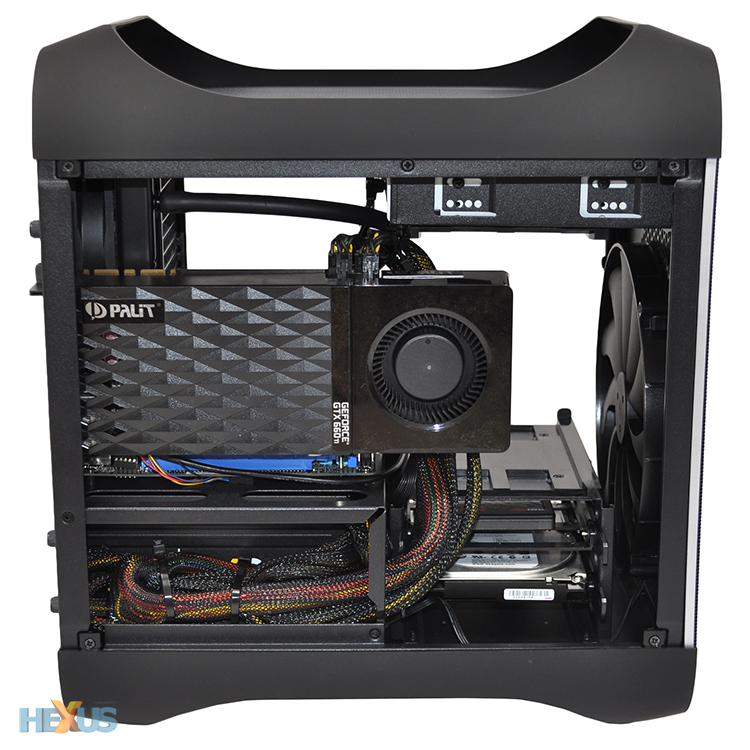
Well it is smaller so it will not be as spacious as a MidTower would but they have put alot of money into cable routing and organization so you can get a pretty clean PC if you take the time to do it right.
Here is one of the best and granted this was a professional build carried out by a PC Gamer which is a pretty big outlet so they took there time to make this look as good as possible but with two video cards and a watercooled CPU it really does show the room that is possible to achieve some pretty big things. This is also the mATX case meaning its for a different motherboard type than the ITX (comparison) so its a little bigger but that is to accommodate the larger board that ATX is. Only real benefit would be more PCI slots for ATX for things like SLI or more powerful wireless cards/USB expansion cards.

These last three are the ITX case which is the one with the multiple colorways and is capable of fitting in plenty of performance. Once again these have watercooled/aftermarket heatsink CPU's which isn't even necessary but it just goes to show how much room there is. These also show the places they have for you to put your extra cables out of the way.


Here is one of the best and granted this was a professional build carried out by a PC Gamer which is a pretty big outlet so they took there time to make this look as good as possible but with two video cards and a watercooled CPU it really does show the room that is possible to achieve some pretty big things. This is also the mATX case meaning its for a different motherboard type than the ITX (comparison) so its a little bigger but that is to accommodate the larger board that ATX is. Only real benefit would be more PCI slots for ATX for things like SLI or more powerful wireless cards/USB expansion cards.

These last three are the ITX case which is the one with the multiple colorways and is capable of fitting in plenty of performance. Once again these have watercooled/aftermarket heatsink CPU's which isn't even necessary but it just goes to show how much room there is. These also show the places they have for you to put your extra cables out of the way.