
SOMEONE PLEASE HELP!!!
-
Johnny_McClorey_95
- Posts: 249
- Joined: Tue Sep 03, 2013 5:57 pm
- Team: Privateer
- Location: Ireland
SOMEONE PLEASE HELP!!!
Ok so I have a macbook and to run mx sim, I had to partition my hard drive and install windows on one partition, while the Mac OS could run on the other partition. This enabled me to switch between windows (to play sim) and Mac OS (to use photoshop and edit videos), until today. (My start up disk is windows, that means every time i start my laptop up it loads Windows 7, not the Mac OS). When i started up my mac today,I just got a white screen for roughly 30-40 seconds, then a black screen which says "No bootable device - Please insert disk and try again." I think this basically means my computer can't find the Windows 7 disk? I'm not sure, but when i restarted my laptop onto the Mac Os, and went to disk utility (Application which allows you to view your hard drive) then it said that Windows 7 was installed on my laptop and I could even check all of my files from windows 7 on my Mac OS. I'm not sure if this really makes any sense, but if somebody could help me it would be great! If not i'll have to delete my whole windows partition, which has over 50 GB of mx simulator data (Tracks, skins etc.) and even custom helmets and tracks that I've spent alot of time on, but never released. Please someone help! And if you've read down this far, thanks!

-
mxsrider96
- Posts: 3603
- Joined: Mon Sep 10, 2012 12:15 am
- Team: PoGo
- Location: Indiana
Re: SOMEONE PLEASE HELP!!!
If you can view all the files from Windows, why don't you just put the MXS stuff on a flash drive using the Mac OS explorer then reinstall
WAR CRY <3
Sun Burn
-
Johnny_McClorey_95
- Posts: 249
- Joined: Tue Sep 03, 2013 5:57 pm
- Team: Privateer
- Location: Ireland
-
Johnny_McClorey_95
- Posts: 249
- Joined: Tue Sep 03, 2013 5:57 pm
- Team: Privateer
- Location: Ireland
Re: SOMEONE PLEASE HELP!!!
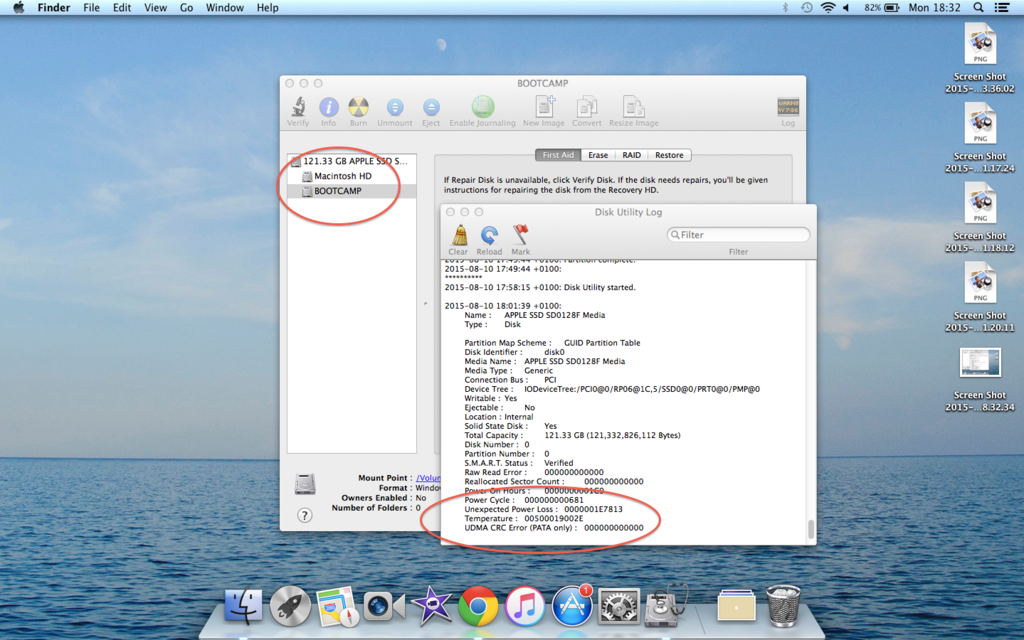
Just checked the windows 7 log and as you can see it says "unexpected power loss". This is listed under the date 2015-08-10, which is today. Not sure what that means as my computer couldn't even recognise the disk in the first place never mind try to start it.
-
Pumaxcs
- Posts: 13227
- Joined: Sat Dec 15, 2007 11:50 pm
- Team: Kyle/Luiz
- Location: Western, Kentucky
Re: SOMEONE PLEASE HELP!!!
This one will be tough to keep up with.
Unexpected power loss means that 90% chance it was in the middle of an update which said "Please do not power off the machine while this performs" and it was so, now it has a half written file that it has no idea what to do with. A repair may actually be possible for something like that instead of a reload.
Unexpected power loss means that 90% chance it was in the middle of an update which said "Please do not power off the machine while this performs" and it was so, now it has a half written file that it has no idea what to do with. A repair may actually be possible for something like that instead of a reload.

-
Johnny_McClorey_95
- Posts: 249
- Joined: Tue Sep 03, 2013 5:57 pm
- Team: Privateer
- Location: Ireland
Re: SOMEONE PLEASE HELP!!!
I attempted to repair it but for some reason i wasn't able to even select the repair button. I've deleted the partition with Windows on it now and im downloading a new ISO image to try it again, I've transferred some of my stuff from my sim personal folder onto my Mac OS so hopefully it will work.Pumaxcs wrote:This one will be tough to keep up with.
Unexpected power loss means that 90% chance it was in the middle of an update which said "Please do not power off the machine while this performs" and it was so, now it has a half written file that it has no idea what to do with. A repair may actually be possible for something like that instead of a reload.